# 製品ドキュメント
**ForePaaSプラットフォームの製品ドキュメント**へようこそ
この製品ドキュメントは、ForePaaSプラットフォームを利用するユーザーの皆さんを念頭に構成されています。この製品ドキュメントでは、皆さんがForePaaSプラットフォームを最大限に活用し、優れた運用環境を実現して、プロジェクトを成功に導くことを目指しています。
このガイドの内容をすべて参照することで、ForePaaSプラットフォームについての深い理解を得ることができます。このガイドには、**すべてのコンポーネントの詳しい解説と利用可能な機能の詳細説明**に加えて、これらを最大限に活用する方法を記載しています。また、新しい概念や機能を理解するのに役立つサンプルや視覚資料も盛り込まれています。
実際に製品の利用するようになったときには、このガイドを参照して、使用頻度の少ない機能を再確認したり、問題の解決に役立てたりすることができます。
---
## ForePaaSプラットフォームの概要
ForePaaSプラットフォームを利用すると、組織(企業全体、ビジネスユニット、部門、または個人)は、最新のクラウドテクノロジー、アーキテクチャ、ソフトウェアを活用しながら、堅牢かつスケーラブルなクラウドネイティブAIアプリケーションを作成してデプロイできます。
 ---
## 設計理念
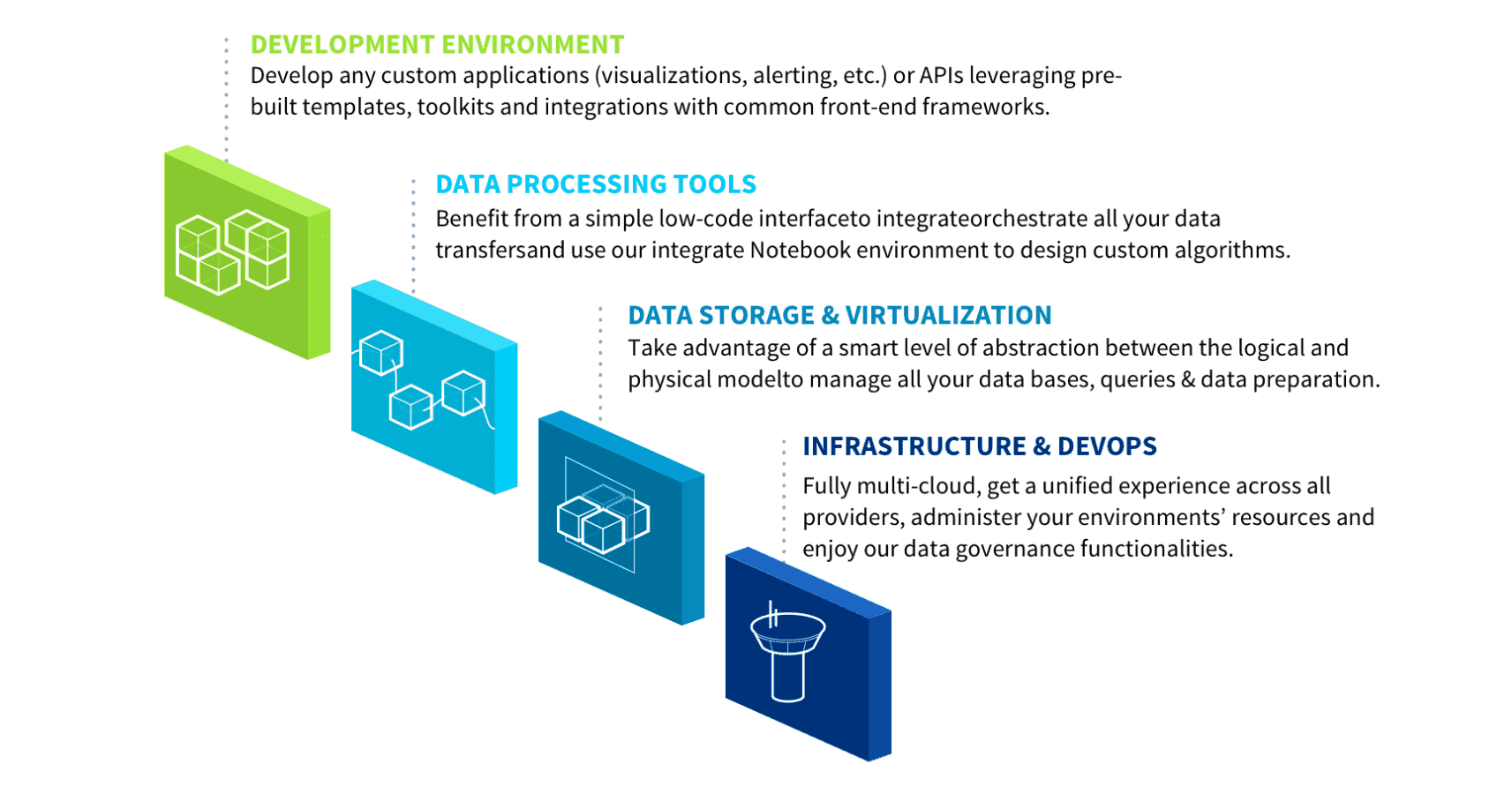
弊社はForePaaSプラットフォームを構築するにあたり、**ユーザーがデータに関するあらゆる課題に対処でき、アプリケーション開発サイクルを加速化できるような、エレガントなソリューションを実現する**というシンプルな考え方に沿って設計を行いました。これに沿って設計されたプラットフォームは、以下の4つのシンプルな自動化レベルを通じて、技術的に複雑な部分を見せないようにしたことで、ユーザーがよく分からないまま技術的な判断を行ったり、多大な労力を費やしたりする必要のない形になりました。
---
## 設計理念
弊社はForePaaSプラットフォームを構築するにあたり、**ユーザーがデータに関するあらゆる課題に対処でき、アプリケーション開発サイクルを加速化できるような、エレガントなソリューションを実現する**というシンプルな考え方に沿って設計を行いました。これに沿って設計されたプラットフォームは、以下の4つのシンプルな自動化レベルを通じて、技術的に複雑な部分を見せないようにしたことで、ユーザーがよく分からないまま技術的な判断を行ったり、多大な労力を費やしたりする必要のない形になりました。
 ForePaaSプラットフォームを使用する際に、組織は[データプラント](/jp/product/dataplant/index)という専用の環境を作成します。データプラントには、データセット、データプロセス、アルゴリズム、Webアプリケーションが収容されます。
?> 通常、データプラントへのアクセスは、組織で定義された**ユーザーのアクセスレベル**に従って、コラボレーションを行うユーザー間で共有されます。例えば、1つ目のユーザーグループがデータアクセスと変換を担当し、2つ目のユーザーグループがAIモデルを担当、そして3つ目のユーザーグループがWebアプリケーションインターフェースを担当することができます。
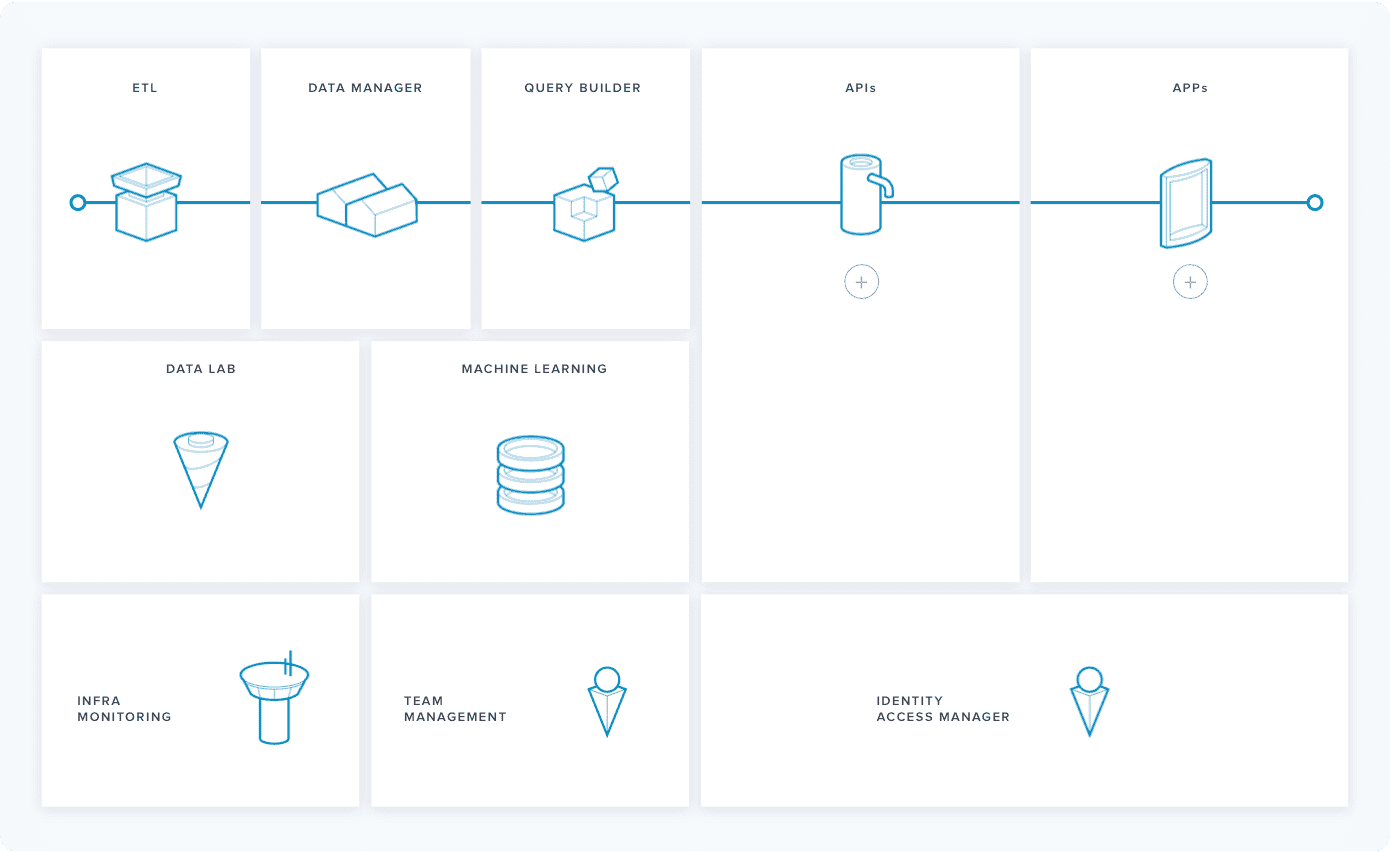
データプラントには、**データのライフサイクルを管理するのに必要なすべてのコンポーネント**、つまり、データプロジェクトを成功させるためのプロセス、ルール、ユーザーアクセス権限が含まれています。以下の画像には、これらのコンポーネントがすべて示されており、コンポーネントをクリックすると、それぞれの詳細を確認できます。また、論理的な構成に沿ってガイドを参照すると、最も効果的にForePaaSプラットフォームを利用できるようになります。
---
## では始めましょう!
データプラントを起動すると、60を超えるマイクロサービスが運用環境にデプロイされます。ForePaaSはわずか8分足らずで、選択されたクラウドプロバイダーにマシンを自動的にプロビジョニングします。ユーザーによる入力は必要ありません。初めてデータプラントを使用する場合は、以下の記事を参照してください。
{4つのシンプルなステップでデータプラントを作成する方法を確認する}(#/jp/product/dataplant/create-dataplant.md)
{データプラントのコンポーネントについて詳しく確認する}(#/jp/product/dataplant/index.md)
---
## サポートが必要な場合
新しい製品に慣れるのには時間がかかります。疑問点やご質問がある場合は、[弊社のセールスチーム](https://www.forepaas.com/jp/contacts/ "連絡先")、または[サポートエキスパート](https://support.forepaas.com)まで遠慮なくお問い合わせください。よろこんでお手伝いいたします。
ForePaaSプラットフォームを使用する際に、組織は[データプラント](/jp/product/dataplant/index)という専用の環境を作成します。データプラントには、データセット、データプロセス、アルゴリズム、Webアプリケーションが収容されます。
?> 通常、データプラントへのアクセスは、組織で定義された**ユーザーのアクセスレベル**に従って、コラボレーションを行うユーザー間で共有されます。例えば、1つ目のユーザーグループがデータアクセスと変換を担当し、2つ目のユーザーグループがAIモデルを担当、そして3つ目のユーザーグループがWebアプリケーションインターフェースを担当することができます。
データプラントには、**データのライフサイクルを管理するのに必要なすべてのコンポーネント**、つまり、データプロジェクトを成功させるためのプロセス、ルール、ユーザーアクセス権限が含まれています。以下の画像には、これらのコンポーネントがすべて示されており、コンポーネントをクリックすると、それぞれの詳細を確認できます。また、論理的な構成に沿ってガイドを参照すると、最も効果的にForePaaSプラットフォームを利用できるようになります。
---
## では始めましょう!
データプラントを起動すると、60を超えるマイクロサービスが運用環境にデプロイされます。ForePaaSはわずか8分足らずで、選択されたクラウドプロバイダーにマシンを自動的にプロビジョニングします。ユーザーによる入力は必要ありません。初めてデータプラントを使用する場合は、以下の記事を参照してください。
{4つのシンプルなステップでデータプラントを作成する方法を確認する}(#/jp/product/dataplant/create-dataplant.md)
{データプラントのコンポーネントについて詳しく確認する}(#/jp/product/dataplant/index.md)
---
## サポートが必要な場合
新しい製品に慣れるのには時間がかかります。疑問点やご質問がある場合は、[弊社のセールスチーム](https://www.forepaas.com/jp/contacts/ "連絡先")、または[サポートエキスパート](https://support.forepaas.com)まで遠慮なくお問い合わせください。よろこんでお手伝いいたします。