

Packages preloaded in Data Platform action containers
All actions & workflows when launched are built and run in containers which come with preloaded packages
Objective
All actions & workflows when launched are built and run in containers which come with preloaded packages. That way, especially in the case of custom actions, you don't have to always manually specify which librairies you need to run your code.
Currently Data Platform jobs are only compatible with Python 3+, there is therefore only 2 default packages for you to manage:
- Python Libraries: If you're about to write your own custom action, no need to give you a lecture on Python libraries... in the background, we're simply running a pip install command.
- Data Platform Modules: In order to keep a light weight image of the containers all Data Platform connectors are not loaded automatically. To use a specific connector using the SDK, please specify the required modules from our internal supported list.
Default Python Librairies
Below is the list of all the Python libraries and corresponding version number installed by default in the Data Platform DPE containers:
Note that we don't allow users to override the default libraries installed with older versions to prevent incompatibility issues.
However, you can absolutely install any other libraries on top of the list provided above by adding them in "Requirements" field of your custom action configuration whether in the UI or in the JSON file. Simply use the same format as when using a pip install command to specify the version's library.
Explore all Python libraries on Pypi's official website
Data Platform Modules
When you create a new custom action using the Data Platform Data Processing Engine you will certainly be connecting to external data sources and use a variety of file formats. Data Platform possesses a pre-existing list of modules to handle both data formats & connector types inside your code.
The list of modules preinstalled by default includes primarily support for generic file format & other component of the platform (data warehouse & data store): mySQL, S31, CSV, XML, XLS, XLSX, JSON. Parquet file formats are not installed by default because of the size of the module (approximately 400 MB) which would add latency for the build of the workers.
To install Data Platform modules for your custom actions you can either do it via the Custom action configuration GUI under the Requirements section. For instance, if you use the SDK functions to connect to an external Dropbox source but have not installed the Dropbox module, your code will throw an error unless you configure your custom action as below:
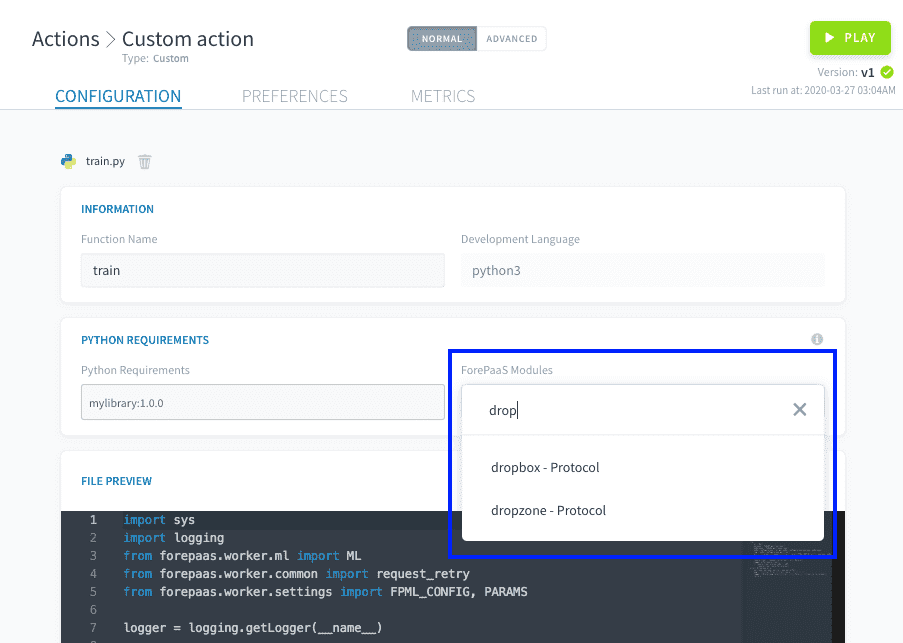
Or you can directly input the list of the modules in the JSON configuration of the action under the key modules:
Note that by default in the UI dropdown, all modules will be installed to their latest version. If you are trying to install a specific version please specify it in directly in the JSON configuration of the action (see syntax above) in Advanced mode.
Below is the exhaustive list of additional available Data Platform modules that can be installed in DPE workers (which corresponds to the list you can find in the Lakehouse Manager's source's marketplace):
Go further
For training or technical assistance implementing our solutions, contact your sales representative or visit our Professional Services page to request a quote and have your project analysed by our experts.
Ask questions, give your feedback and interact directly with the team building the Data Platform on the dedicated Discord channel.
If you need support with your OVHcloud services, create a request in our Help Centre.
Join our community of users.
1: S3 is a trademark of Amazon Technologies, Inc. OVHcloud's service is not sponsored by, endorsed by, or otherwise affiliated with Amazon Technologies, Inc.