

Discover segmentation over a set of files
For sources with the same structure in a distant source folder, this segmentation mode allows the Data Processing Engine (DPE) to automatically find all
Objective
For sources with the same structure in a distant source folder, this segmentation mode allows the Data Processing Engine (DPE) to automatically find all files in a folder, then create tasks with a specific number of files. It will replace the source file in “load_from.source” actions for each files.
Example: Every day, there will be new file(s) coming in the source. you need your load action to absorb all those files incoming, not knowing in advanced their exact name.
- rides_chicago_2020-01-01.csv
- rides_paris_2020-01-01.csv
- rides_tokyo_2020-01-01.csv
Each task will manage different files, allowing for parallelization of work amongst different workers.
Requirements
Before using this segmentation type, some points must be checked:
- All the files must have the same format and structure
- All files must be in the same folder
- If other files with different structures are present in the folder, the files must have specific naming such as it can be filtered out by a RegExp.
- All the attributes/columns present in the schema, and also in each file, must:
- Be present (except for semi-structured formats such as XML or JSON: they will be replaced by NULL values if not present) ;
- have the same type or structure. (example: datetime structures)
Compatibility
This segmentation option is only compatible with the following actions and sources:
How to use this type of segmentation?
To configure this segmentation option select Based on files in the "Segmentation Type" dropdown.
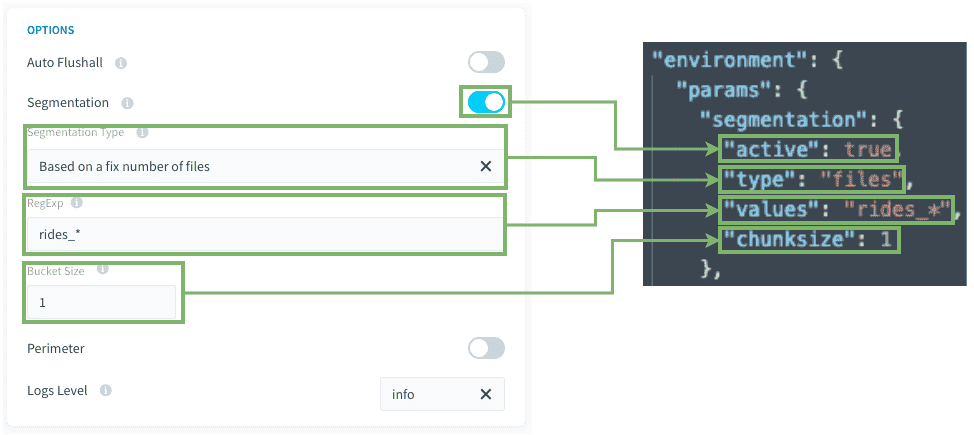
RegExp / Values: You can set a regexp to identify the filenames you want to get. the star (*) character permit to search for any characters (it will be replaced in the regexp by: .* ). It can be a list of RegExps as well. or a hard-coded list of precise filenames.
Bucket size / Chunksize: Set how many files will be absorbed for each task. it is recommended to set this value to 1, unless you have hundreds of files, you will want to put a higher number of files for each task to keep the number of tasks reasonable (under 100 tasks).
Blueprints rules and mapping
In the Connectors, you will need to analyze one file that will serve as the blueprint for all the other files. It's important that you keep the definition of this file in the connectors to keep the blueprint rules.
In the DPE, creating the Load action, you will use the analyzed file as a source. In doing so, all the loaded files will have the same blueprint rules applied.
How does it work behind the scenes?
If your action has a segmentation Based on an fixed number of files, when executing the action, either on its own or via a workflow, it will execute:
- A hidden pre-stage gets all the filenames in your source corresponding to the RegExp set in the configuration.
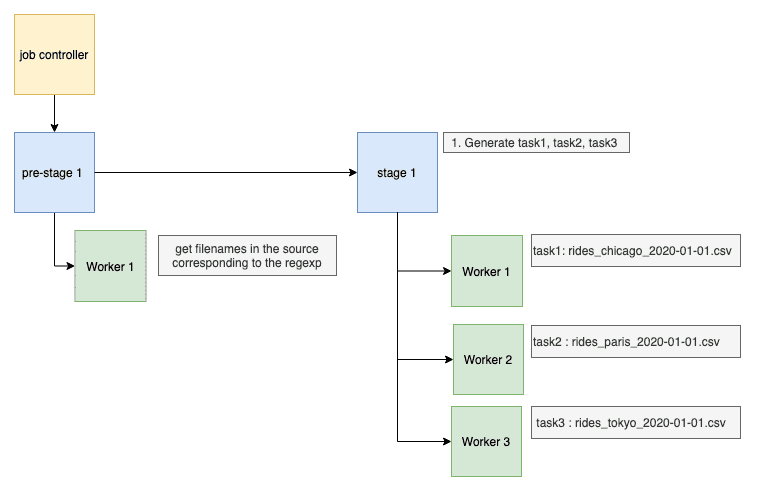
- The Job Controller splits the action into multiple tasks, each with a different value (or set of values, depending on the
chunksizeconfiguration) amongst filenames found in step 1. - Then each worker executes each task one by one.
This means that there is no issue for having hundreds of tasks, your action will be parallelized regarding the number of workers.
Go further
For training or technical assistance implementing our solutions, contact your sales representative or visit our Professional Services page to request a quote and have your project analysed by our experts.
Ask questions, give your feedback and interact directly with the team building the Data Platform on the dedicated Discord channel.
If you need support with your OVHcloud services, create a request in our Help Centre.
Join our community of users.
1: S3 is a trademark of Amazon Technologies, Inc. OVHcloud's service is not sponsored by, endorsed by, or otherwise affiliated with Amazon Technologies, Inc.