

Roles and conditions
Data Platform uses a role-based access control approach to manage rights in Projects
Objective
Data Platform uses a role-based access control approach to manage rights in Projects. Roles are a set of permissions that can be attributed either to a user, a service account (only in Project IAM) or a group, in order to grant them access to resources or data in your Project/Organization. Conditions allow to be more fine-grained and grant access only if specified conditions are met - such as if the request is made during the work hours, or if the requested resource has a certain tag.
Each user or service account has the total sum of all the permissions given to them 1) individually through roles, and 2) given to the groups they belong to.
Note that Roles exist both in the Project and Organization IAMs. The screenshots in this article have been taken in the Project IAM, but the steps are the same in the Organization IAM.
Roles
There are two types of roles in IAM:
- Pre-made roles: which provide access for popular combinations of services and resources in a Project or Organization. These are managed by Data Platform.
- Custom roles: which provide fine-grained access based on a user-specified list of permissions.
Pre-made roles
Data Platform comes with many pre-made IAM roles designed to help you grant the typical permissions for any Project or Organisation easily.
For instance, here is the list of pre-made roles in the Project IAM, starting with the most popular ones:
- Admin: gives full admin access to the entire Project
- Application User: gives access to query the custom APIs of the Project, typically from an application. This is typically the role that you would grant to your end-users that need to access your apps, controlling data access using a role condition
- Analytics Consumer: this is typically given to users who will run analytics using an external consumer. The role gives read access to data sources and tables, and the ability to create and run queries on them.
- Dashboard Editor: gives permissions to create queries and dashboards in the Analytics Manager
- Dashboard Viewer: gives permissions to access the read-only version of dashboards in the Analytics Manager
- Read-only: gives read-access to all resources on the Project
- AM Admin: gives full admin access to all resources in the Analytics Manager
- API & App Editor: gives full admin access to all custom APIs and applications
- Control Center Editor: gives full admin access to all resources in the Control Center
- LM & AM Editor: gives full admin access to all resources in the Lakehouse Manager (except Buckets) and the Analytics Manager
- DPE Editor: gives full admin access to all resources in the Data Processing Engine
- DataStore Editor: gives full admin access to all resources in the Buckets
- Identity Access Manager Editor: gives full admin access to all resources in the Identity Access Manager
Note that the list of default roles is different for the Organisation IAM since the permissions and typical use cases are different.
Create a role
From the Identity Access Manager interface
In the Identity Access Manager, open the Roles tab. Click on New Role at the top-right of the screen.
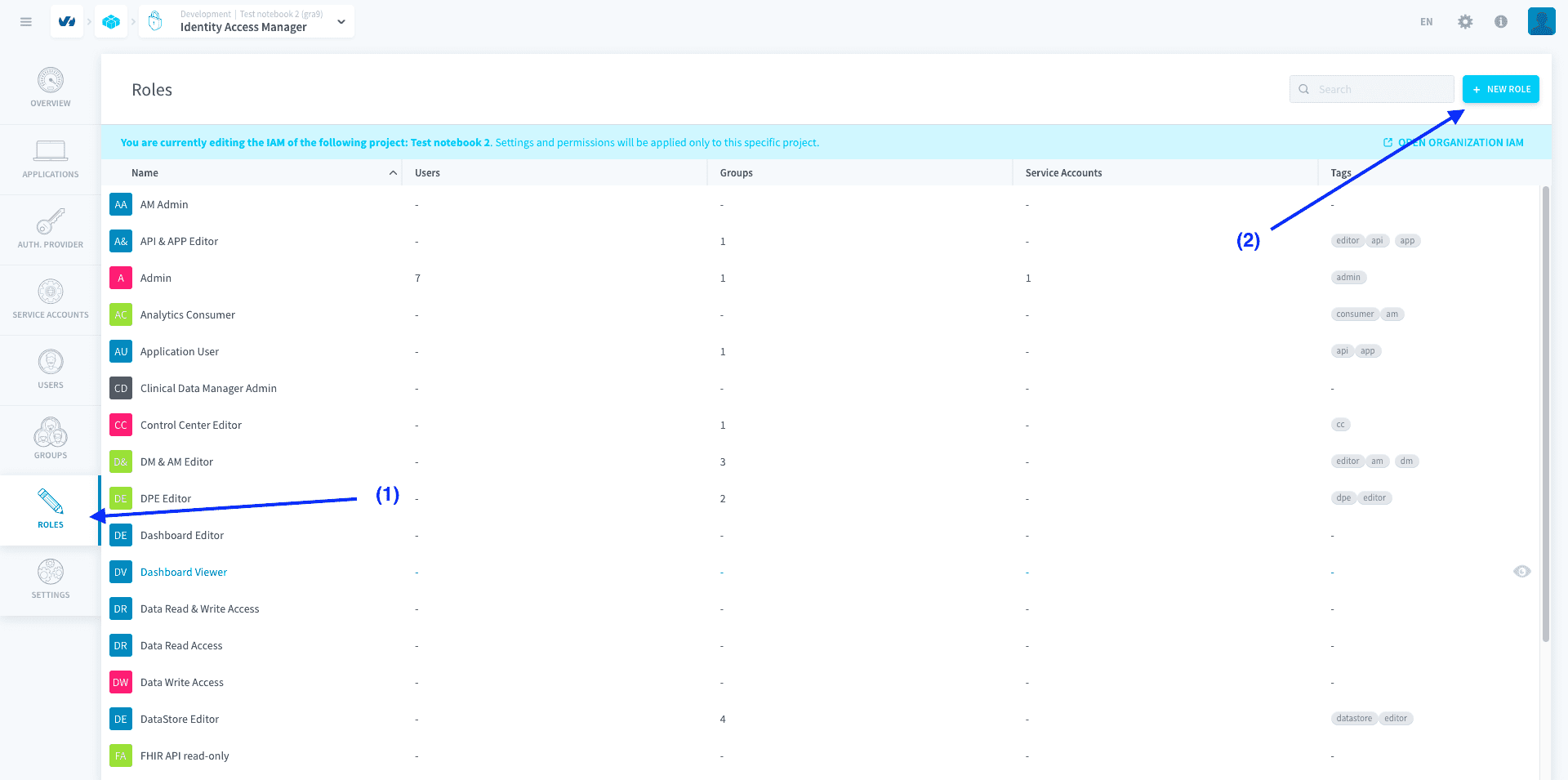
Roles are defined by the atomic permissions they contain, which are rights on specific resources.
After you fill out the picture, name, description and tags of your role, click on Add Permission to add a new permission to the role.
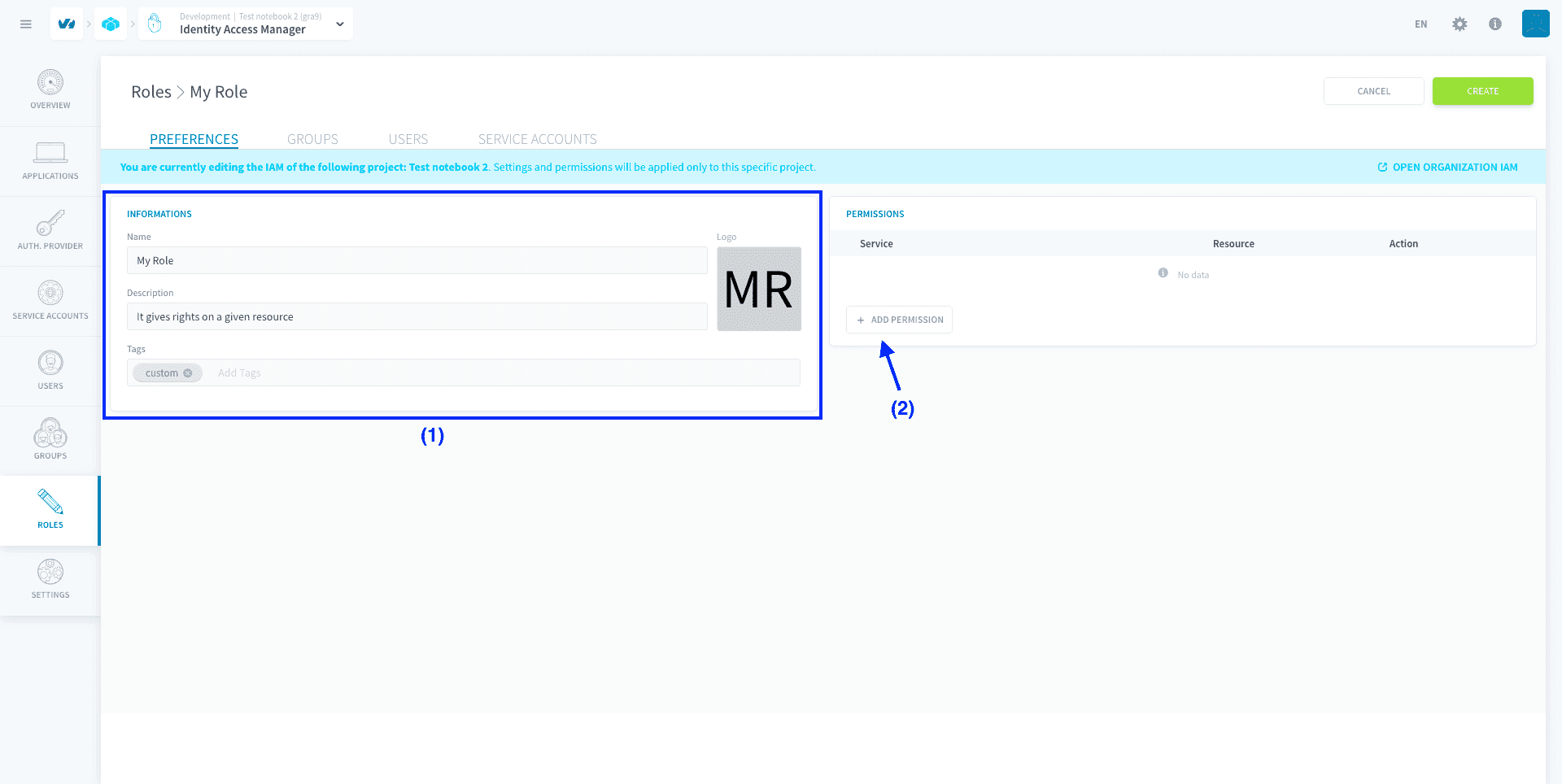
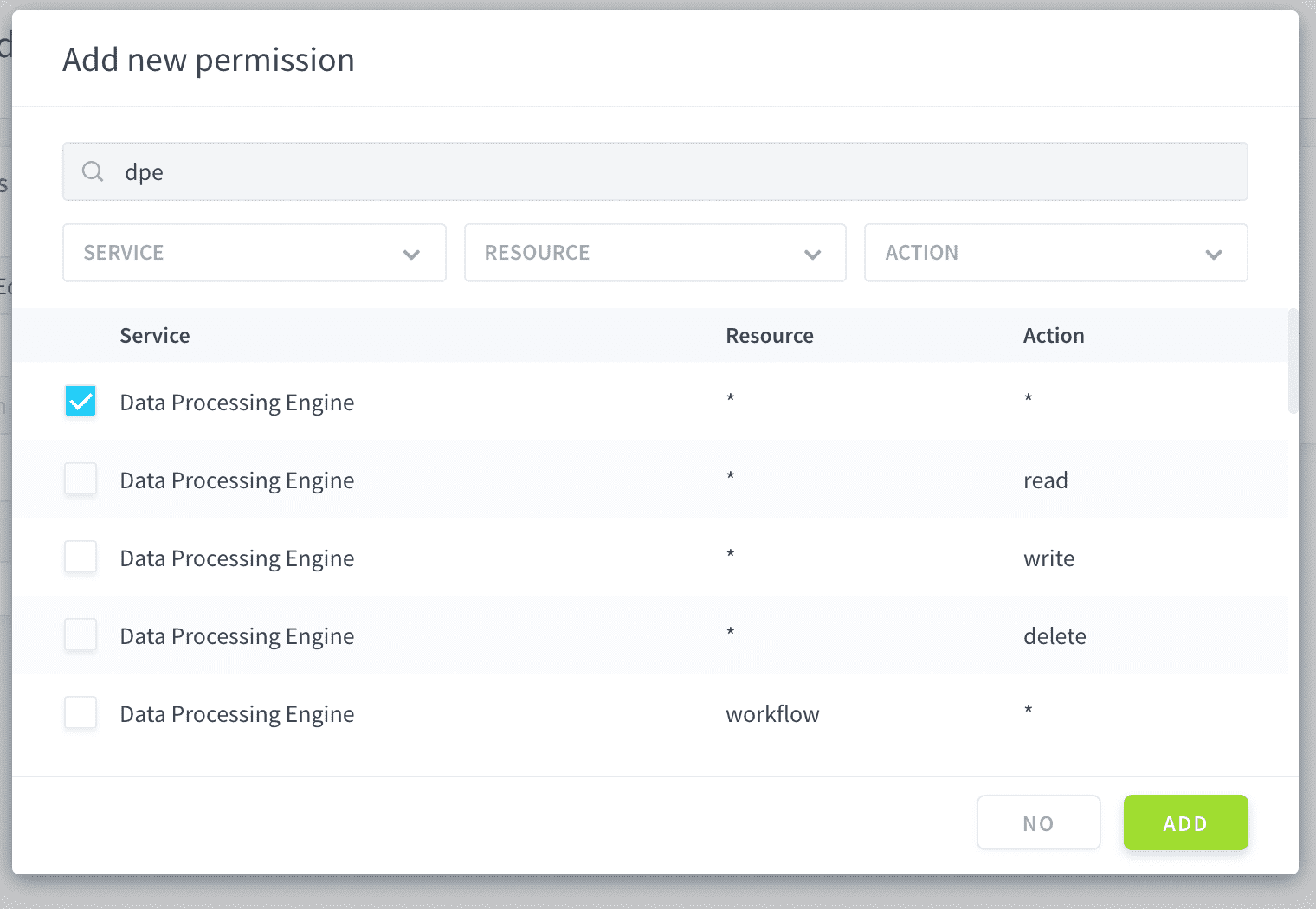
Permissions are defined by specifying the following elements:
- the service and the resource, i.e the Project resource given access to by the permission (e.g in Data Processing Engine: actions, workflows, etc.)
- the action, i.e. which access is given to this service and resource (e.g. create, read, delete, etc.)
The asterisk (*****) value means all services/resources/actions are selected
Conditions on a property of the resource or user agent can be set during the binding of the role with a user or a group.
You can add as many permissions as you want to a role. For example, the role below combines full access to the Workflows in the DPE with a read-only permission on every resource of a second service.
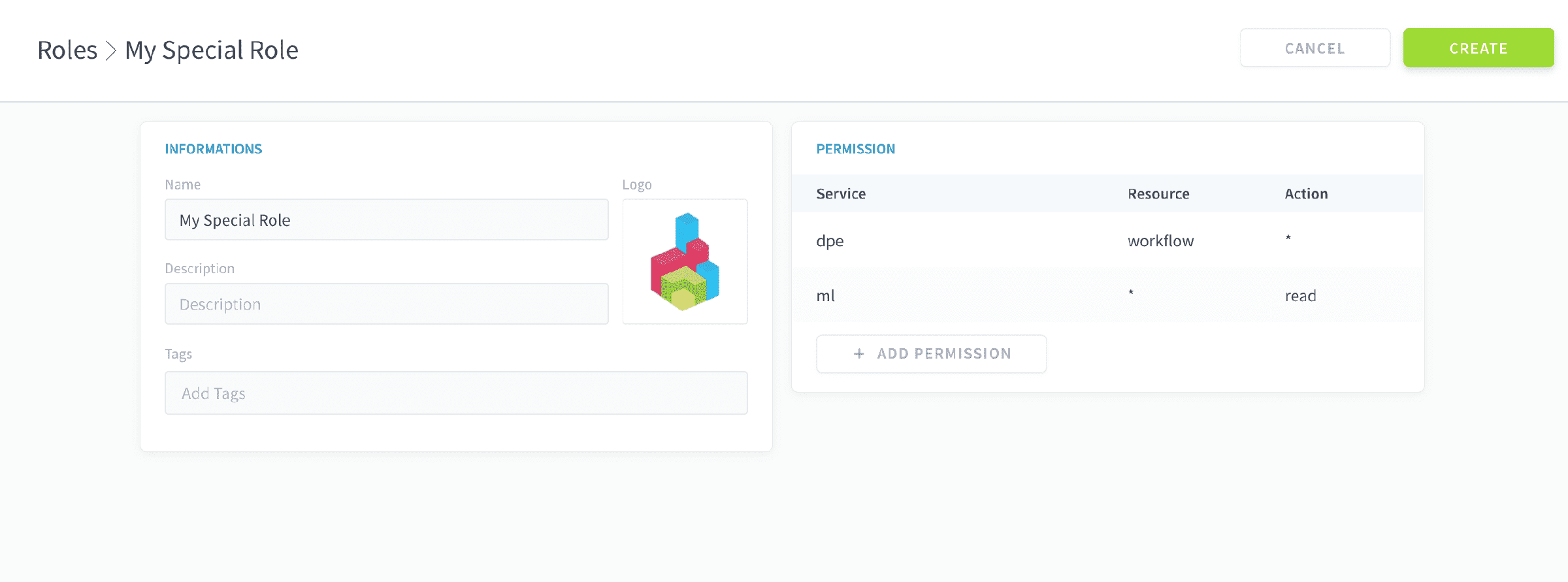
Finally, click on Create to save your role.
Using the API
Bind a role to a user, service account or group
From the Identity Access Manager interface
The process is identical for users, service account, and groups. To bind a role to any of them, simply go to their respective tab in the Identity Access Manager.
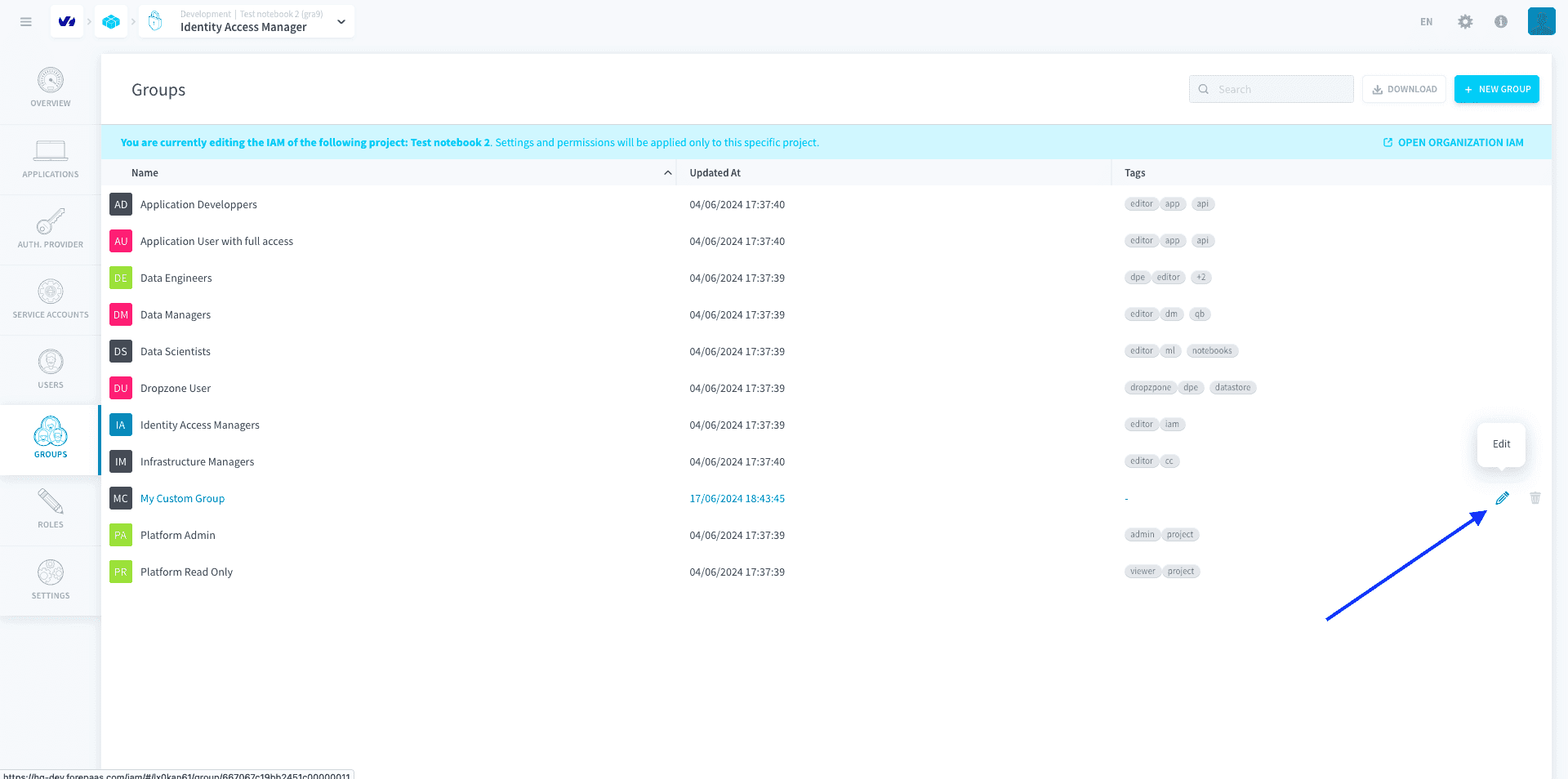
Select the user/service account/group you want to modify, and click on the Edit ✏️ button at the end of the row.
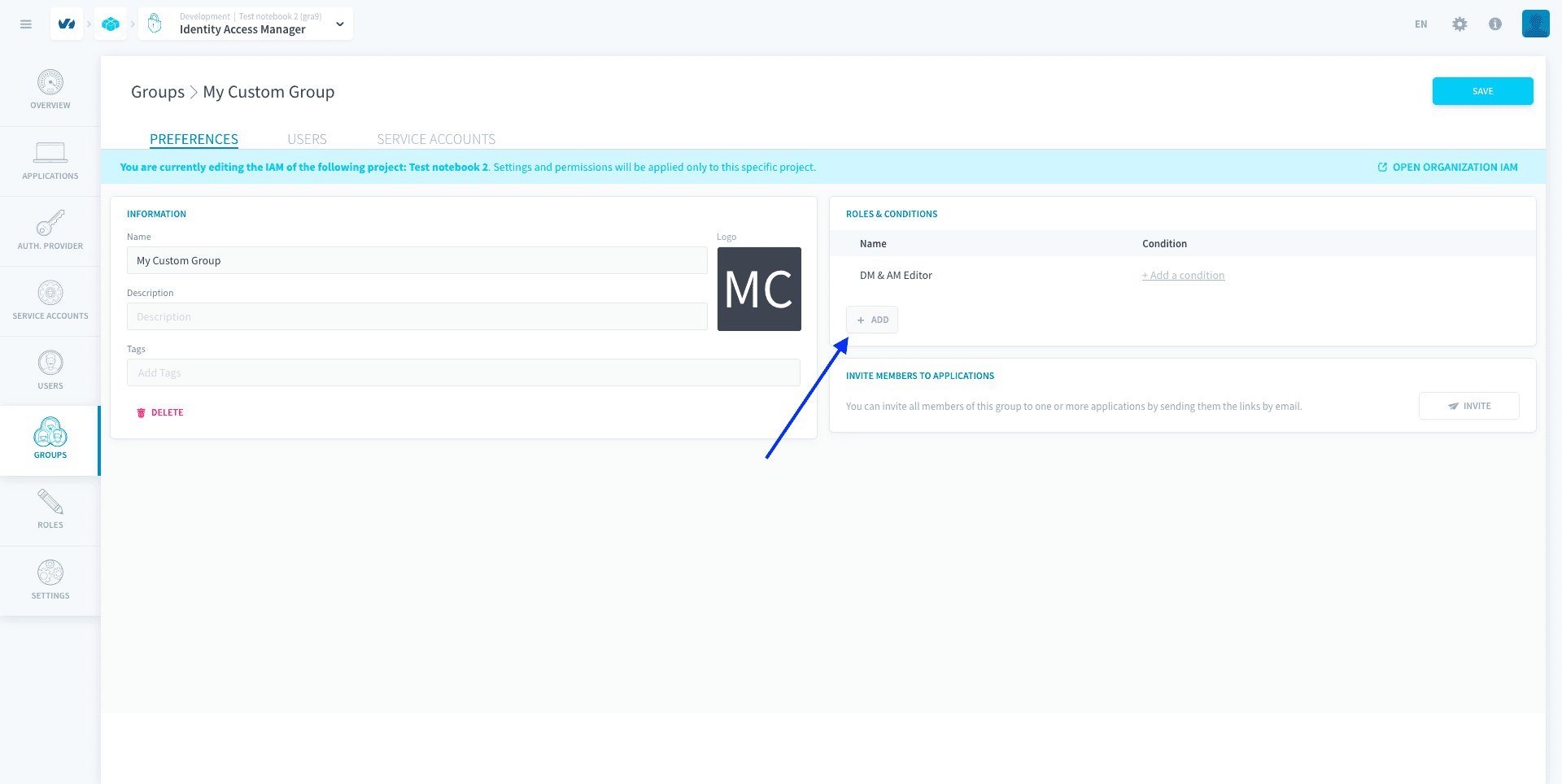
Click on Add in the Role Conditions box.
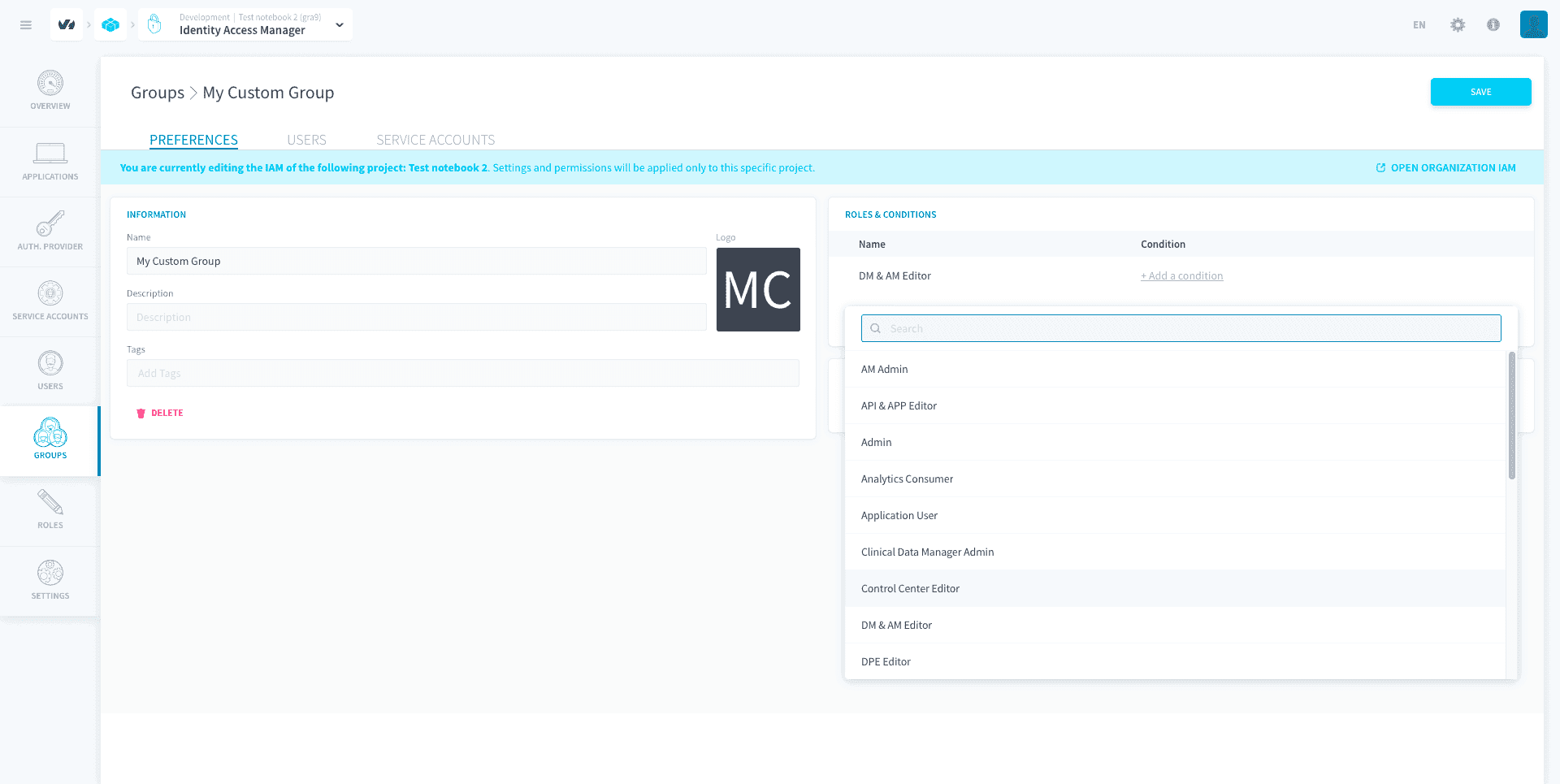
Choose the role you want to bind in the dropdown menu. You can also set a condition on the role binding (see below).
Click on Create, then on Save.
Using the API
Conditions
Conditions are filters that you can set on the permissions granted by a role when you are binding it to a user / service account / group.
By default, roles are bound with no condition. Binding a role without setting a condition will give the full access with no restriction described by the permissions of this role. Adding a condition will filter the access provided by the permissions only to more specific resources, or for users validating specific properties.
For example, if you bind a role with permission cc:alert:write without any condition to a user, they will be able to edit the whole list of Control Center alerts.
However, if you add a condition such as Name.contains("dev-"), this role only gives the user editing-access to the alerts whose name contain "dev-", and they won't be able to edit the other alerts.
2 models of conditions currently co-exist: legacy JSON conditions and new CEL conditions. It is impossible to create a legacy JSON condition on a role that now support new CEL conditions. See down below the compatibility info for each model.
New CEL conditions
CEL conditions are currently unavailable for roles that contain permissions for the service API.
CEL conditions are expressed using Common Expression Language (CEL). They are made of logic statements that can be combined using boolean operators (AND, OR), each logic statement being constituted of the following elements:
- one attribute
- one operator (which can be a function applied on the attribute)
- a value
In general, CEL conditions can either be applied on the resources described by the role's permissions, on the IAM principal to which the role is granted (coming soon!), or on a combination of both. On top of this, conditions can also be applied on elements of the permissions granted by a role, in order to fully fine-grain the conditions to parts of the role only. See down the reference for all attributes and operators.
Condition attributes
The following conditions (i.e. condition's attributes) are currently available in the Identity Access Manager:
- Conditions on the role's permissions
- Service (CEL name:
Service): apply a condition on the Data Platform service containing the resource described by the permission (e.g. "Data Processing Engine", "Analytics Manager", etc.) - Resource (CEL name:
Resource): apply a condition on the Data Platform resource described by the permission (e.g. "Workflows", "Dashboards", etc.) - Action (CEL name:
Action): apply a condition on the access granted to the resource by the permission (e.g. "Read", "Write", etc.)
- Service (CEL name:
- Conditions on the resources
-
ID (CEL name:
Id): apply a condition on the ID of the resource -
Technical Name (CEL name:
Name): apply a condition on the technical name of the resource -
Path (CEL name:
Path): apply a condition on the path of the resource
-
- Conditions on policy tags (Advanced Data Access Control)
- Policy Tag value (CEL name:
PolicyTags.<key>): apply a condition on the value of a policy tag assigned to the resource. Replace<key>with the tag key name (e.g.,PolicyTags.sensitivity == "high"). Available when the role contains permissions for the serviceadac. - Policy Tag existence (CEL name:
has(PolicyTags.<key>)): check whether a policy tag key exists on the resource (e.g.,has(PolicyTags.sensitivity)). Returns true if the tag key is present, regardless of its value.
- Policy Tag value (CEL name:
When using ADAC conditions, the Resource attribute accepts the values dataset, table, and attribute. The Service attribute value for Advanced Data Access Control is adac. See Policy Tags, CEL Conditions for detailed patterns and examples.
- Conditions on the user/service account: coming soon!
WARNING: conditions on a read permission are currently only enforced when getting an object from API - they are not enforced in the graphical interface when listing and opening objects. For example, with a role containing read-access to IAM groups bound with a condition on the name of one IAM group, a user will still be able to list, open and view all IAM groups in the GUI, but will only be able to call (GET) that one specific group by API.
Condition operators
The following conditions (i.e. condition's operators) are currently available in the Identity Access Manager.
Some operators are only available for specific attributes.
- Equals (CEL modelling:
attribute == "") - Not equals (CEL name:
attribute != "") - In (CEL name:
attribute in []) - Not in (CEL name:
!(attribute in [])) - Starts with (CEL name:
attribute.startsWith("")) - Not starts with (CEL name:
!(attribute.startsWith(""))) - Ends with (CEL name:
attribute.endsWith("")) - Not ends with (CEL name:
!(attribute.endsWith(""))) - Matches (CEL name:
attribute.matches("")) - Not matches (CEL name:
!(attribute.matches(""))) - Contains (CEL name:
attribute.contains("")) - Not contains (CEL name:
!(attribute.contains("")))
Examples
Here are some examples in Common Expression Language (CEL) of conditions:
- Restrict access to only the resources named "demo":
- Restrict access to only the workflows contained in the folder "my_folder", and full access to the other resources allowed by the role (provided the role initially gives access to workflows and other resources):
- Restrict access to only the bucket named "my_bucket" (related service name is datastore) and to the rest of the resources in other services as allowed by the role (provided the role initially gives at least access to buckets and to some resources in other services - note that this condition will block access to resources in datastore that are not buckets altogether):
- Enforce policy tags at all three levels, dataset, table, and attribute (related service name is adac). This is the recommended pattern for full access control:
- Grant access to tables tagged with
sensitivity: high, with pass-through at dataset and attribute levels (no tag enforcement at those levels):
- Grant access to all tables that do not have the
sensitivitypolicy tag:
Through conditions, you cannot give access to resources/actions that were not initially permitted by the role. Conditions can only filter a role further.
Add a condition when binding a role
There are 2 ways to add a condition on a role binding.
- The visual builder gives a point-and-click interface to specify conditions using a field, an operator and a value (e.g. Resource name equals my_bucket).
- The custom CEL editor is a condition writer in Common Expression Language (CEL) to create similar conditions.
Tutorial: how to build a role condition on a specific bucket
Legacy JSON conditions
The legacy JSON editor is a condition writer using a JSON format. JSON conditions are currently deprecated and will be migrated automatically to new CEL conditions.
Add a role condition on specific data value(s)
This section relates to a legacy JSON condition. JSON conditions are currently deprecated and will be migrated automatically to new CEL conditions.
To restrict access to specific data values in your application or your API, you must use the filter parameter on an API-related permission.
First, create a role having access to API * *:
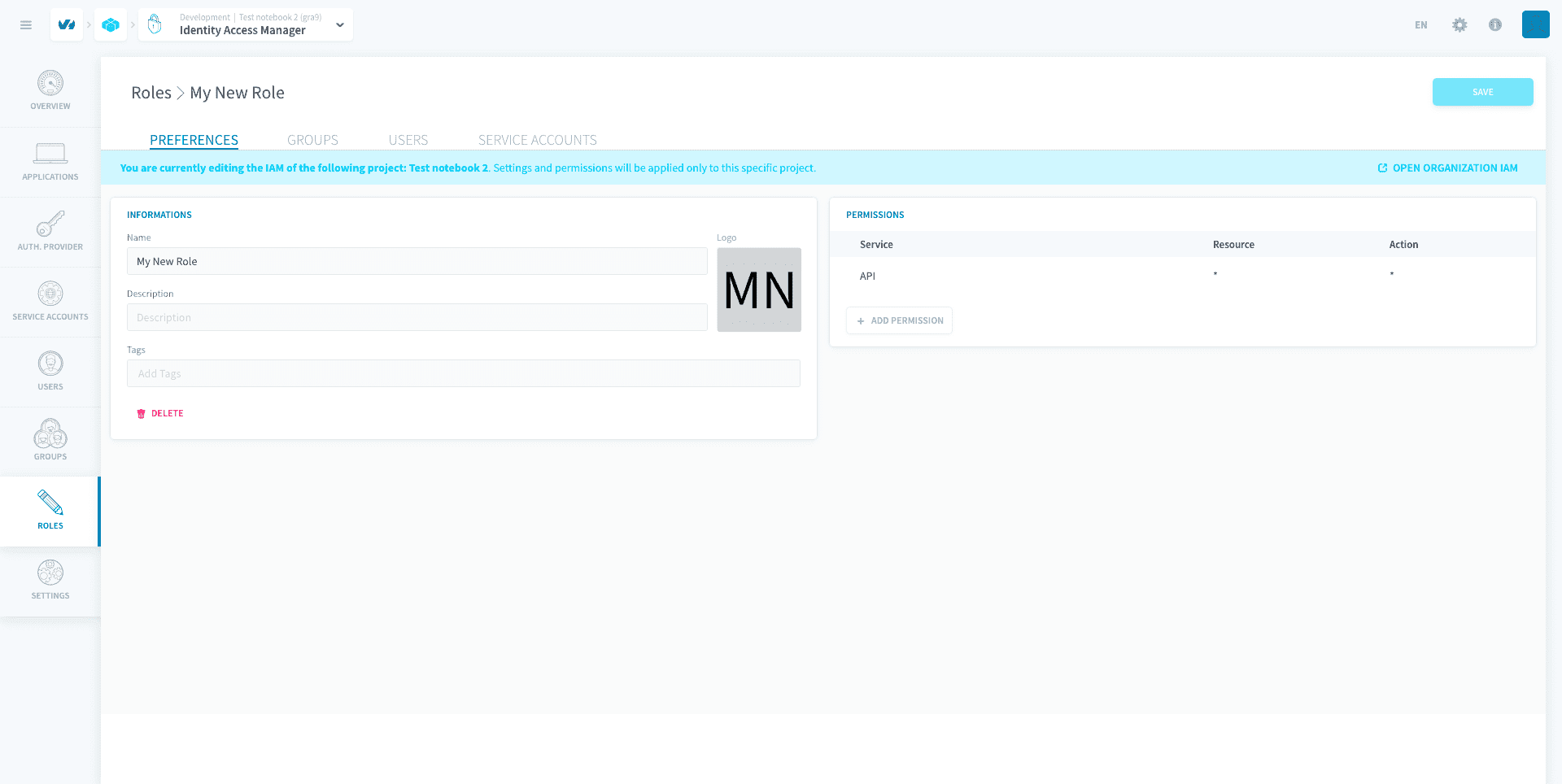
Then, bind this role to the group/user of your choice, and add a role condition.
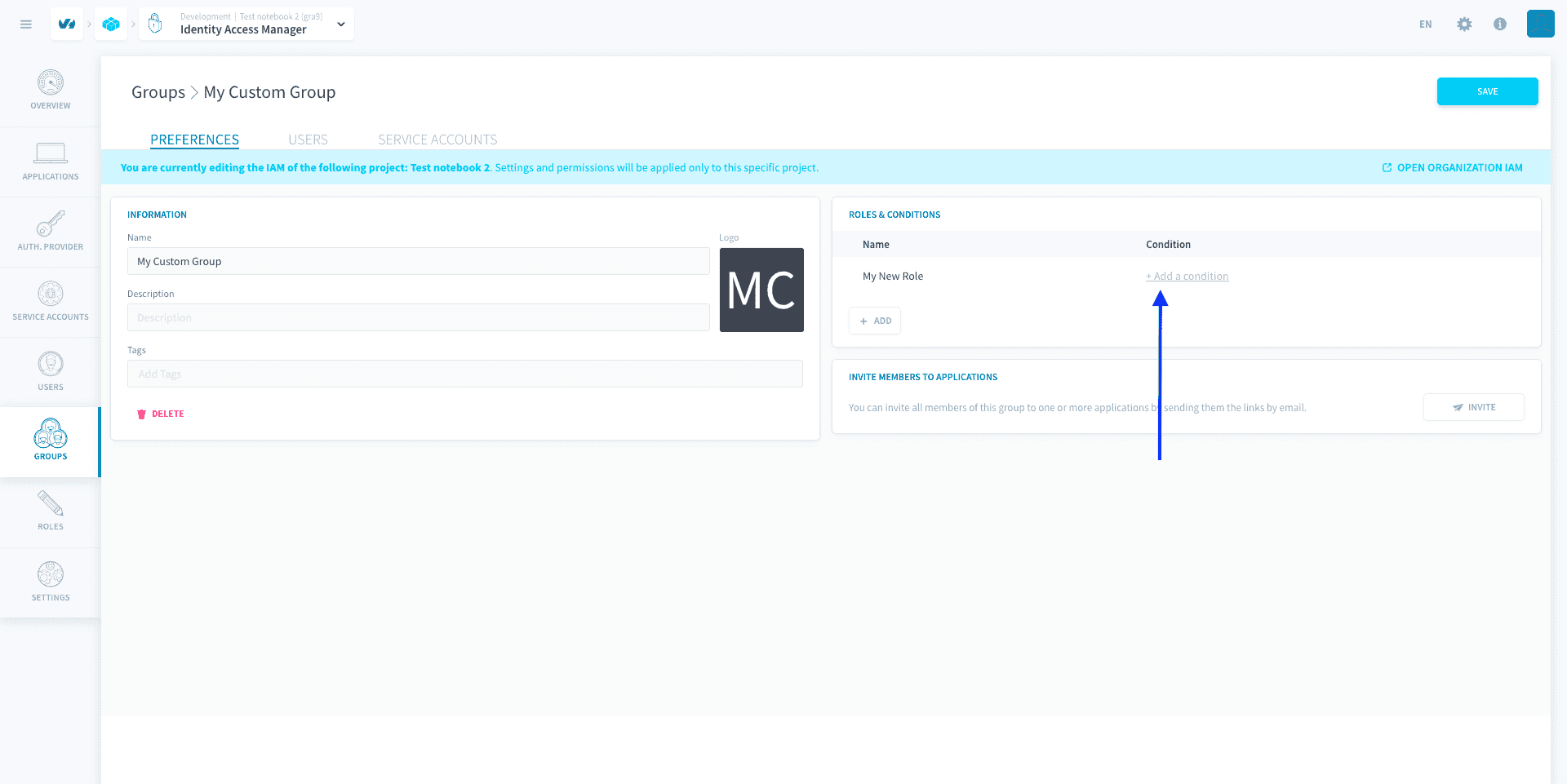
Set the condition with the filter parameter to the binding. The filter parameter takes in a dictionary of attributes names and list of values for each attribute.
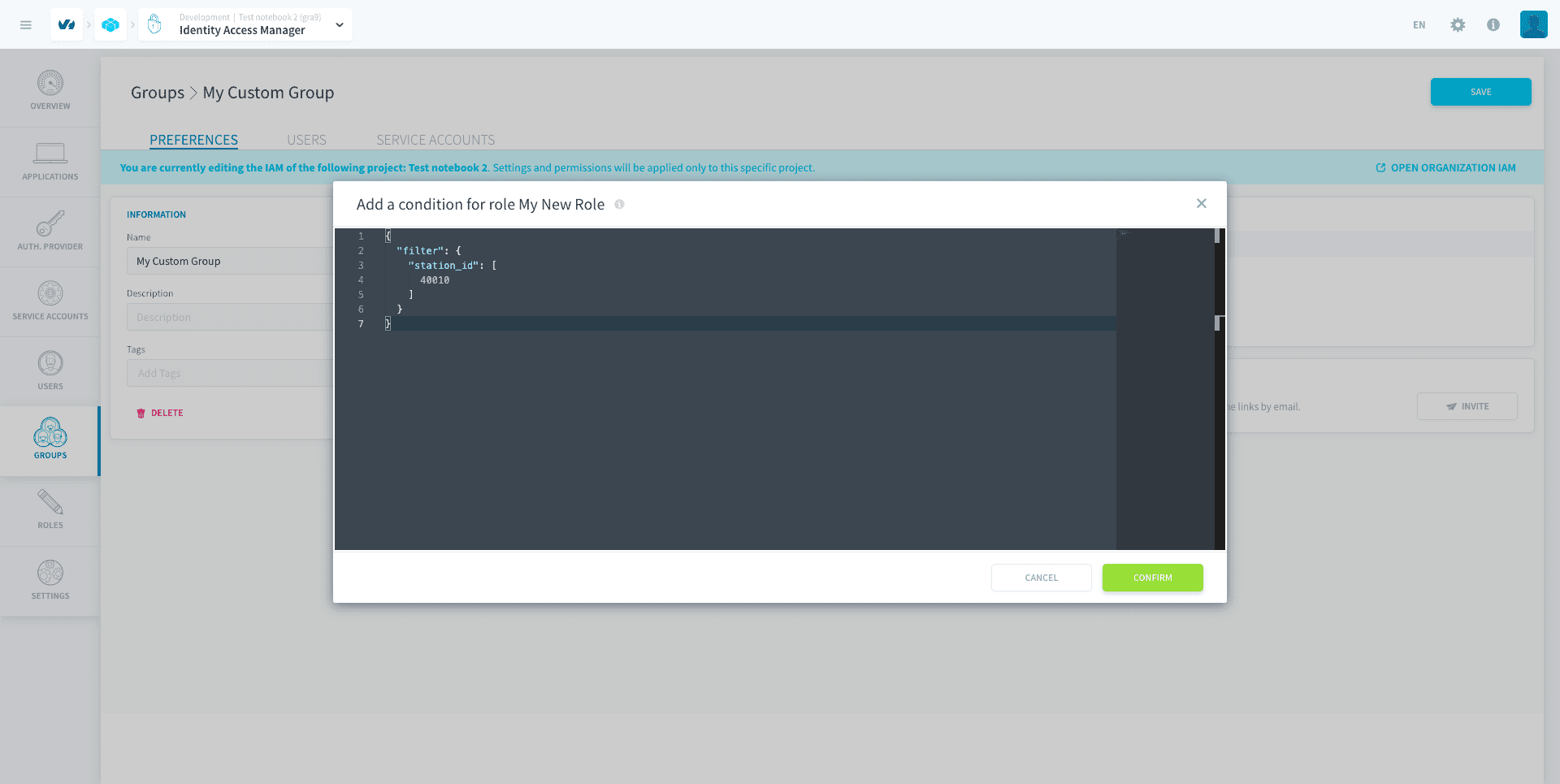
You can enter several values in the filter, to filter on multiple attributes at once (AND operator) or on multiple values of an attribute (OR operator).
Add a role condition on a specific bucket
This section relates to a legacy JSON condition. JSON conditions are currently deprecated and will be migrated automatically to new CEL conditions.
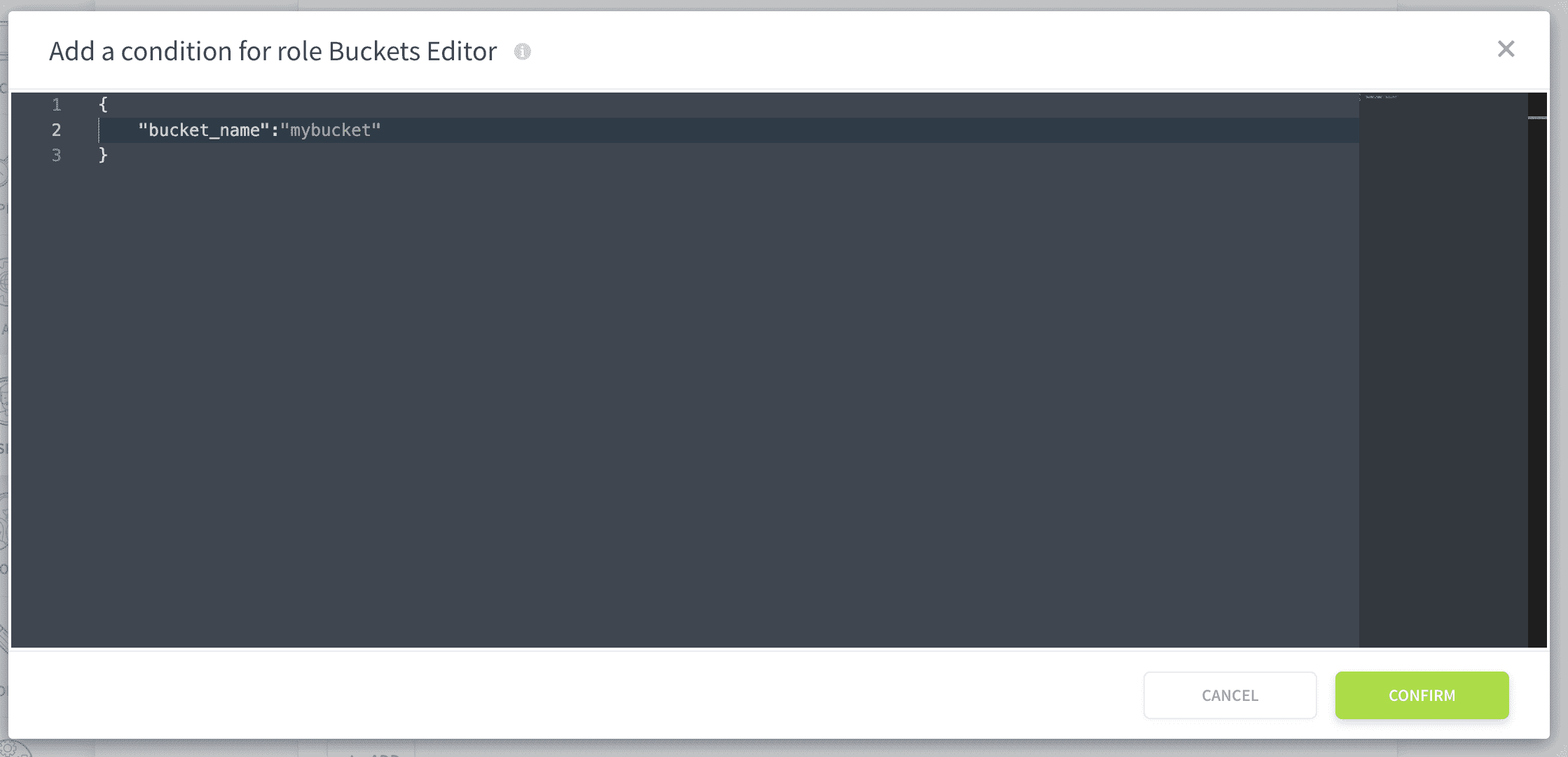
To restrict access to specific buckets in your Lakehouse Manager, you must use the bucket_name parameter on an Data store-related permission.
Data Store is the original name of the buckets on Data Platform.
First, create a role having access to datastore * *.
Then, bind this role to the group/user of your choice, and add a role condition with the bucket_name parameter to the binding.
Go further
For training or technical assistance implementing our solutions, contact your sales representative or visit our Professional Services page to request a quote and have your project analysed by our experts.
Ask questions, give your feedback and interact directly with the team building the Data Platform on the dedicated Discord channel.
If you need support with your OVHcloud services, create a request in our Help Centre.
Join our community of users.