

Delete Diff Action
This action is used to delete obsolete entries that existed at one time but no longer exist. Compatible with all Data Platform data engines
Objective
This action is used to delete obsolete entries that existed at one time but no longer exist. Compatible with all Data Platform data engines.
Usecase example
An erroneous data entry was made to a source file. The DPE automatically inserted the entry into the primary and aggregate tables. Once the incorrect entry was discovered, it was deleted from the source, however, it still remains in the primary and aggregate tables.
How to use it
When you need to delete items that no longer exist, we recommend creating a temporary table that will serve as a work zone, containing only the data you wish to keep. This will allow you to set up a perimeter on the date field which allows you to act only for a given duration. If you have to act on all the data, then the easiest way is not to use delete diff, but to simply empty the tables beforehand with flush tmp and to fill it with the new data via the source.
Create a delete diff action for each table you wish to remove the records from, using the temporary table as the reference table. Select the attribute you wish to preform the comparison on. Optionally, set a date perimeter via the preferences section.
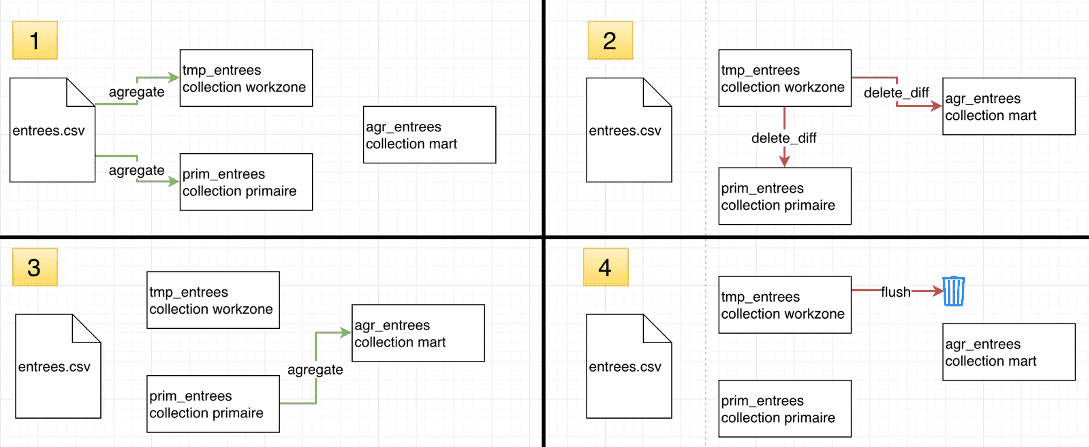
Advanced mode example
Go further
For training or technical assistance implementing our solutions, contact your sales representative or visit our Professional Services page to request a quote and have your project analysed by our experts.
Ask questions, give your feedback and interact directly with the team building the Data Platform on the dedicated Discord channel.
If you need support with your OVHcloud services, create a request in our Help Centre.
Join our community of users.