

Optimize table storage with maintenance actions
Users want the data to load almost instantly in their final consumer endpoint whether an API or a visual dashboard application
Objective
Users want the data to load almost instantly in their final consumer endpoint whether an API or a visual dashboard application. For this purpose, Data Platform works with caches to pre-compute the result of queries or pre-load the general information about the data model.
However, this also means that cache & metadata need to be managed and updated regularly during your processing procedures. Within the marketplace of actions in the Data Platform Store, you will therefore find 3 types of maintenance actions:
- Update Metadata: which updates the metadata of the data model.
- Flush Cache: Analytics Manager: which updates the cache of the Analytics Manager to display the latest data from the data model.
- Flush Cache: App Services: which updates the cache of the deployed API in your project to display the latest result of each queries.
All three are best run at the end of a workflow that affects the data model. We highly recommend to simply append them by default at the end of each workflow.
Automated Maintenance
While it can be useful to precisely choose when these actions are run during a workflow for optimisation purposes, we understand that it can be cumbersome to manage. We therefore suggest 2 simple ways you can append this maintenance routine to your processing procedures.
Auto Flush-all Workflow
When you create a new Project, we advise you create a workflow _flushall which contains 4 actions that run sequentially in 4 stages: Update metadata, Flush Cache: Analytics Manager, Flush Cache: App Services and then Purge Buckets.

The Purge Buckets action should be deactivated by default (or not included if you foresee no immediate use) as it empties all the data currently stored in the object store. This action is to be used with caution as it will permanently delete all archived information.
Auto Flush-all Options
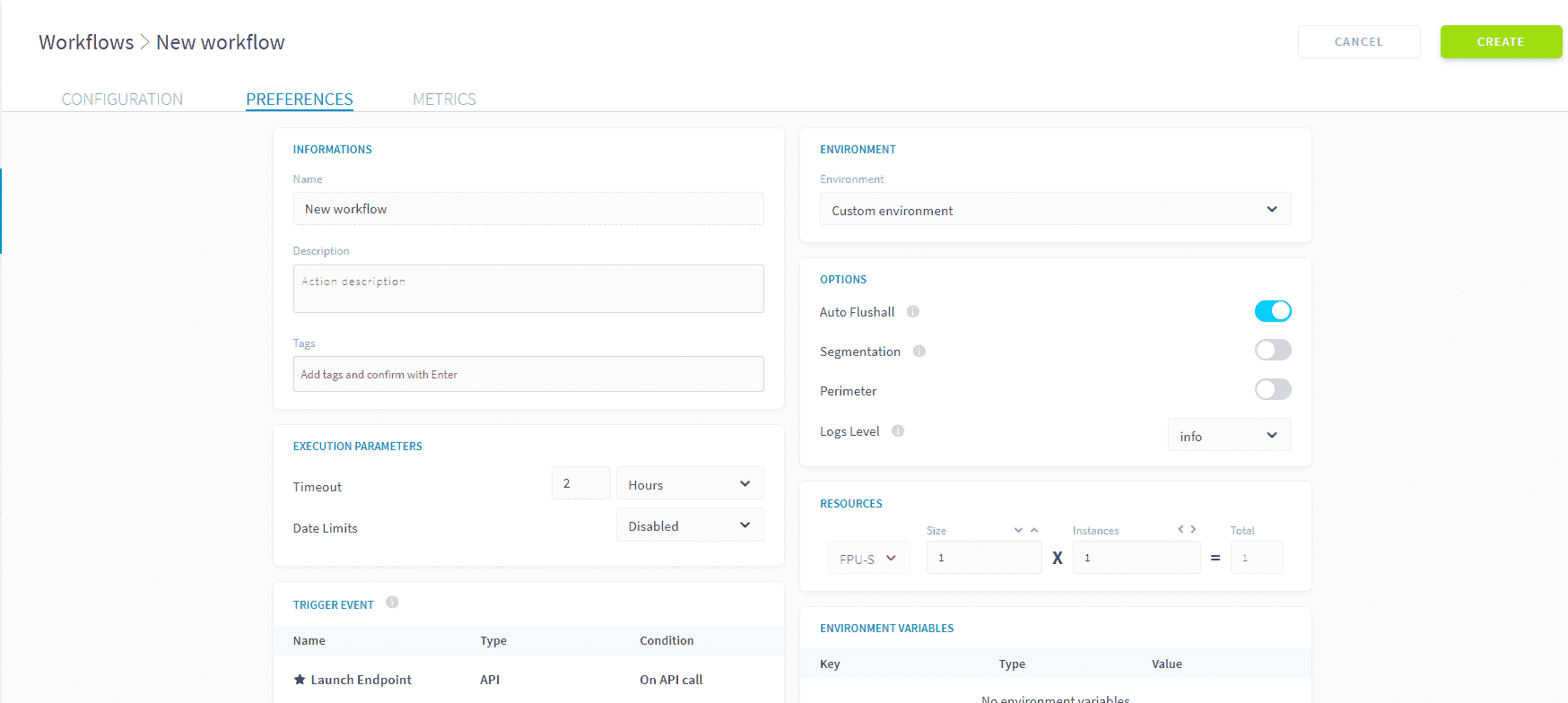
Another way to run this maintenance routine is simply to activate the "Automatically flush all caches" option for your workflows, located in the preferences tab of your workflow. This will run the 3 actions: Update metadata, Flush Cache: Analytics Manager, Flush Cache: App Services.
Update Metadata
The Update Metadata action is used to update the metadata of the data model stored either in the data warehouse or the datastore. It is strongly advised to run it at the end of the execution of a workflow which usually affects the data model. The metadata of the data model is used by other components to navigate the data model such as the Analytics Manager, or the APIs.
When creating a new Update Metadata action, no configuration is required.
Note that the action can be quite intensive and run for a long time if the size of your data warehouse is large. We therefore recommend running them once per workflow not systematically after each action, to optimize your execution runtime.
Flush Cache: Analytics Manager
This action is used to flush the cache of Analytics Manager. It is highly recommended to launch it at the end of a workflow. This guarantees that the Analytics Manager uses the latest metadata from Lakehouse Manager.
The action takes an optional params.timeout parameter, see Setting an action timeout. Its JSON configuration looks as follows:
Flush Cache: App Services
This action is used to call the Project's APIs in order to flush its cache. It is highly recommended to launch it at the end of a workflow. This guarantees that the API displays the latest values of pre-configured queries or attributes.
The action takes an optional params.timeout parameter, see Setting an action timeout. Its JSON configuration looks as follows:
Setting an action timeout
Both flush cache actions accept a timeout:
In order to add an action timeout, go to the preferences and enable the timeout parameter, adding the desired time, or alternatively, edit the JSON configuration of the action.
Go further
For training or technical assistance implementing our solutions, contact your sales representative or visit our Professional Services page to request a quote and have your project analysed by our experts.
Ask questions, give your feedback and interact directly with the team building the Data Platform on the dedicated Discord channel.
If you need support with your OVHcloud services, create a request in our Help Centre.
Join our community of users.