For AI agents: the complete documentation index is available at https://docs.dataplatform.ovh.net/llms.txt, the full documentation bundle is available at https://docs.dataplatform.ovh.net/llms-full.txt, and this page is available as Markdown at https://docs.dataplatform.ovh.net/sdk/app-basic-ui-image.md.
  • 🇬🇧 English
  • Image

    Warning

    Rework pending, no delivery date. The Front App SDK (ReactJS) and the Front API SDK (NodeJS) are both being replaced. This page documents the current release, remains accurate, and is maintained until the replacement ships. Code written against it keeps working.

    Allows you to add an image to your dashboard.

    Add Image

    Select Basic UI -> Image.
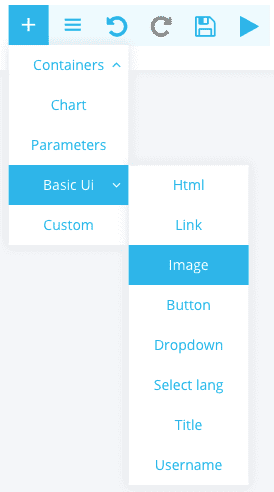
    Exemple Panel

    Configure Image

    Simple configuration

    This configuration allows you to configure the image in a simple and intuitive way.
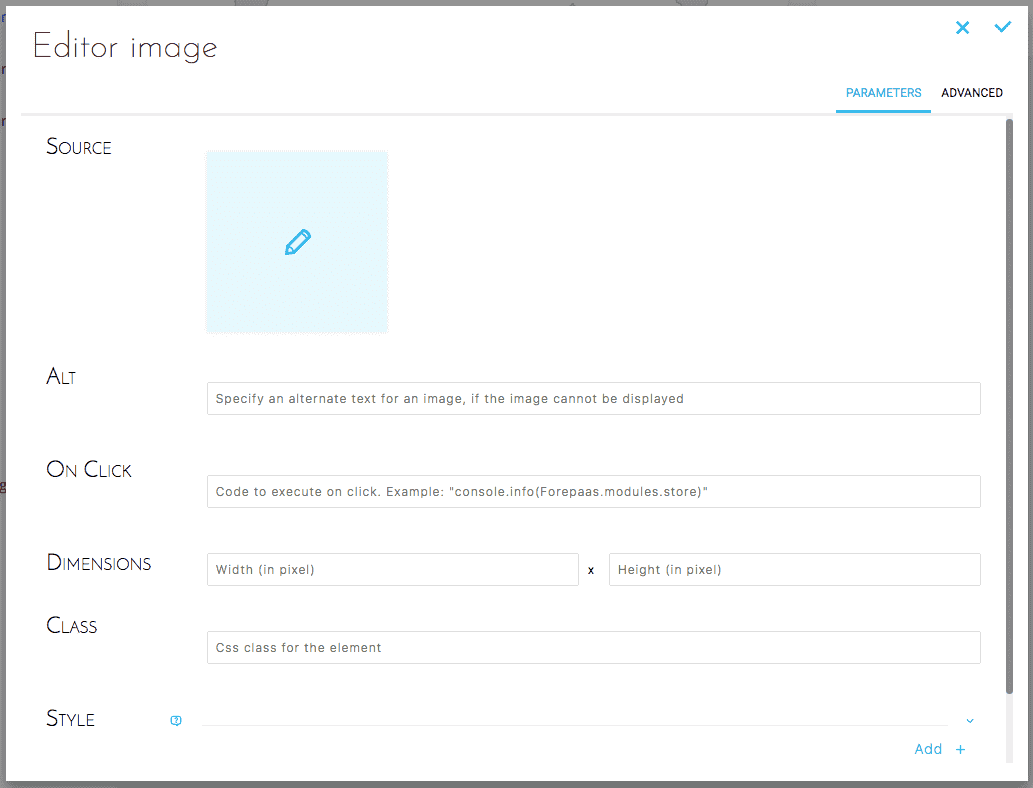
    Exemple Panel

    Exemple Panel

    Advanced configuration

    Below is the equivalent JSON configuration :

    {
      "type": "image",
      "style": {},
      "alt": "my image",
      "onClick": "console.info('click')",
      "width": "50",
      "height": "42"
    }

    Result

    Exemple Panel