

Understanding Data Platform pricing
Data Platform is billed pay-as-you-go. There are no up-front costs, no per-user licence and no data transfer charges: you pay for the compute you run
Objective
Data Platform is billed pay-as-you-go. There are no up-front costs, no per-user licence and no data transfer charges: you pay for the compute you run, by the minute, and for the data you store and query, by volume.
This page explains what generates a cost, the units those costs are counted in, and where to find the current prices. It does not list prices: those live on the OVHcloud public cloud price list, which is the single source of truth for them.
What you pay for
The total cost of a Data Platform project is the sum of a small number of components.
Storage. The data held in the Lakehouse Manager, tables and buckets alike, charged on the volume stored over the month.
Data processing. The compute consumed by Data Processing Engine jobs: loads, aggregations, SQL, custom Python and PySpark. Charged on compute allocated for the duration of each run.
Analytics queries. The queries run from the Analytics Manager and through external consumers, charged on the volume of data scanned.
Application Services. The compute behind deployed APIs and apps, charged for the time each deployment is up rather than per request.
Support. OVHcloud support levels above the standard one are charged as a percentage of the total OVHcloud bill. See the OVHcloud support levels for what each includes.
What is not billed
Data Platform does not charge:
- data transfer, in either direction, for moving data into or out of your account
- data ingest fees
- service API calls
Billing units
Compute is expressed in Data Platform Units.
1 DPU is 1 vCPU and 4 GB of RAM. Compute cost is therefore DPU multiplied by the time those DPU were allocated, usually expressed in DPU hours.
The other units follow the resource they measure: storage in GB or TB held over the month, and analytics queries in TB scanned.
Knowing which components hold DPU, and for how long, is most of cost control:
- A job in serverless mode holds its DPU only while it runs.
- A job in always-up mode holds its DPU continuously, until the execution mode is set back to serverless.
- A notebook holds all its assigned DPU for as long as it is turned on, whether or not code is running.
- A deployed API or app holds its DPU while deployed.
Worked cost examples
Three examples of what a project costs in practice, at small, mid-market and enterprise scale. They show which components each workload consumes and in what volumes, so the shape of a bill is visible before you build one.
Figures are as of 1 September 2026 and are illustrative, not a quote. Rates change: the price list is the only current source.
See three worked cost examples
The three following examples provide insight into the total cost in operating OVHcloud Data Platform to load, process, query data, and expose dashboards.
Cost example: Smaller Company
This hypothetical customer is a small retail business leveraging Data Platform data warehouse capabilities for BI. They ingest 2 GB of data every working day, totaling 40 GB (80M lines) monthly. The process requires 2 DPU for 2 hours daily to load data, plus an additional 2 DPU for 2 hours daily to aggregate tables. Consequently, their total monthly DPU usage reaches 160 hours (2 DPU x 4 hours/day x 20 working days). Their total storage currently stands at 500 GB, and their analytics team scans an average of 2 TB of stored data monthly.
Cost example: Mid-Market
This hypothetical customer is a medium-sized Tech company using Data Platform to centralize and aggregate data analytics from their main Information System tools. They ingest a continuous stream of 720 GB of data per month (1.4 billion lines). Their Data Engineering team performs advanced data transformation using PySpark. Overall, data loading and transformation consume an average of 20 DPUs for 6 hours per working day each month, resulting in 2,400 hours of DPU usage for data processing (20 DPU x 6 hours x 20 working days). Their total lakehouse storage is 25 TB, and their data analysts run queries scanning a total of 50 TB of stored data. Additionally, they use 4 DPUs 24/7 to run deployed Application Services, totaling 2,920 hours of additional DPU usage (4 DPU x 730 hours).
This client decided to subscribe to OVHcloud Business Support to access our technical expert team 24/7 with less than 30 min response time.
Cost example: Enterprise
This hypothetical customer is a health insurance company operating in multiple countries, using the solution to cover the analytics needs of its subsidiaries, aggregated at a group level. They utilize an average of 40 DPUs for approximately 10 hours each, 6 days a week, for advanced data exploration and processing. They store 100 TB of data in their Data Lakehouse. Their data analyst team scans about 500 TB of data for their queries, both locally in the Data Lakehouse and on their remote on-prem storage via direct queries. Additionally, they use 4 DPUs to host APIs and application services deployed 5 days a week (400 hours a month), totaling 1,600 hours of additional DPU usage (4 DPU x 400 hours).
This client decided to subscribe to OVHcloud Business Support to access our technical experts team 24/7 with less than 30 min response time.
Your usage and your invoices
OVHcloud produces a monthly usage statement for every customer with at least one active service. From a project or an organization, open the configuration wheel at the top right of the screen, then Billing information.
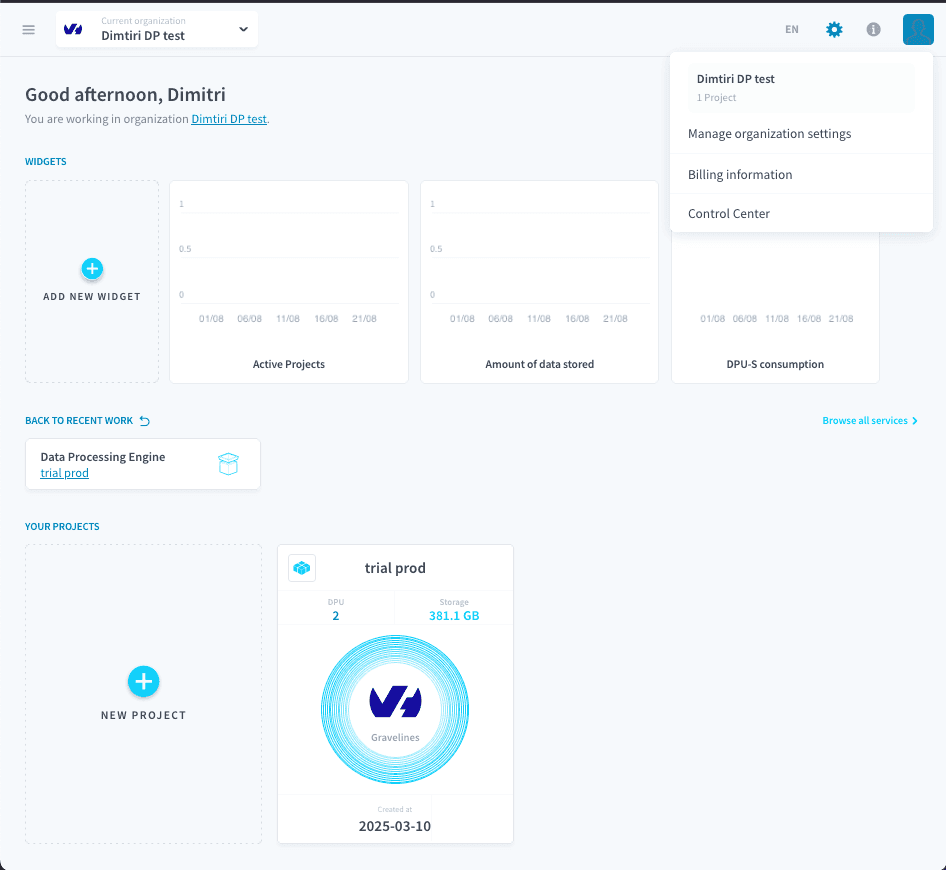
The statement itemizes the month's usage in credits consumed and currency spent, and carries an estimate of the next OVHcloud invoice alongside the history of previous ones, split per service.
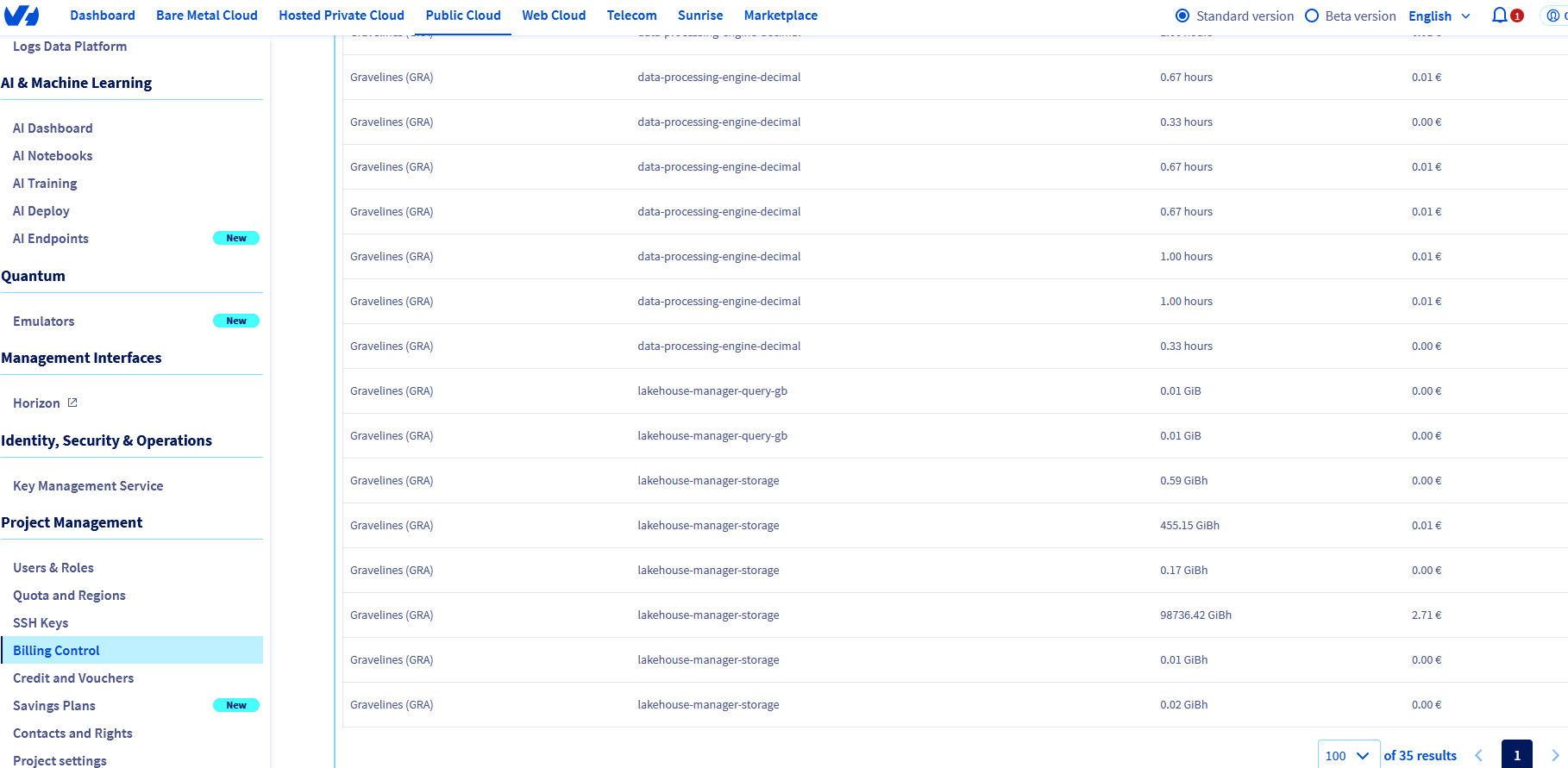
For each Data Platform service the statement shows its region, its type, its volume of usage and the related cost.
Invoices themselves, for Data Platform and every other OVHcloud service, are accessed and managed from the OVHcloud Control Panel. See the OVHcloud article on managing bills for what can be done there.
Live resource consumption, as opposed to its cost, is visible in the Control Center: CPU, memory, storage and network use per component, at project or organization level.
Subscriptions and billing accounts
Subscription plans, committed resources and the ownership of a billing account are managed at OVHcloud account level rather than inside a project, from the OVHcloud Control Panel.
Keeping costs down
- Build a dashboard on your billing data so consumption is visible before it appears on an invoice. The FOCUS and Superset tutorial takes the same data further for FinOps reporting.
- Set quotas at organization level as a safeguard against unintended consumption.
- Prefer a shared environment in always-up mode over always-up on individual actions, so the same resources serve several workloads.
- Archive cold data to OVHcloud Object Storage, in the Standard, Infrequent Access or Cold Archive class as the access pattern requires.
- For a structural review, OVHcloud Professional Services and the data consultancies in the OVHcloud Partner Program assess data architecture and cost together.
Go further
For training or technical assistance implementing our solutions, contact your sales representative or visit our Professional Services page to request a quote and have your project analysed by our experts.
Ask questions, give your feedback and interact directly with the team building the Data Platform on the dedicated Discord channel.
If you need support with your OVHcloud services, create a request in our Help Centre.
Join our community of users.