

Discover segmentation over source accounts
For sources like social media which are user account specific, it is possible to configure multiple accounts for the same source within the Lakehouse
Objective
For sources like social media which are user account specific, it is possible to configure multiple accounts for the same source within the Lakehouse Manager component. You can then leverage these accounts to split an DPE action using that source in several tasks, where each task will retrieve the data from one or more accounts.
Requirements
Before using this segmentation type, some points must be checked:
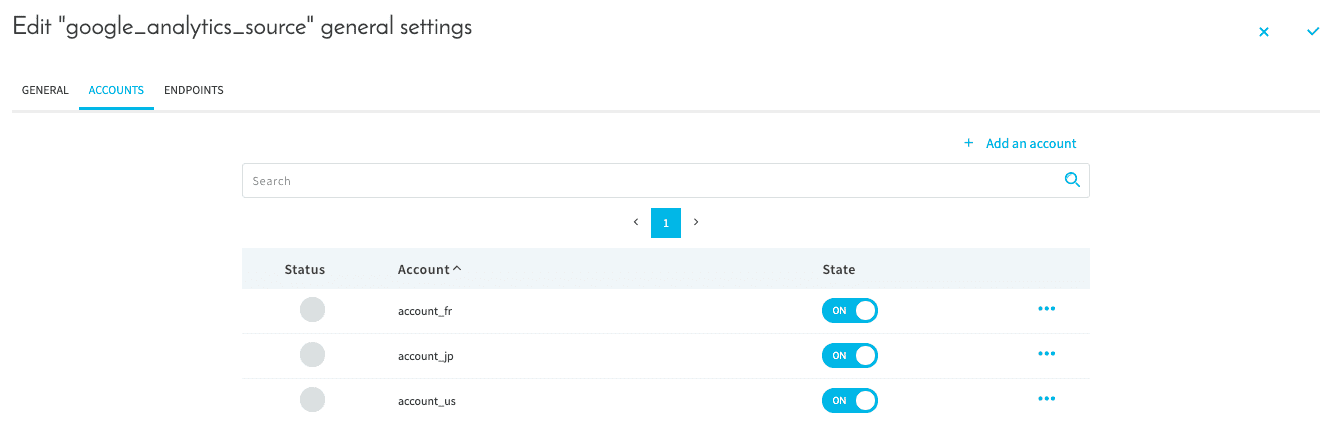
- You already configured a source in the Connectors having some accounts such as below
Compatibility
This segmentation option is only compatible with the following actions and sources:
How to use this type of segmentation?
To configure this segmentation option select Based on the source's accounts in the "Segmentation Type" dropdown.
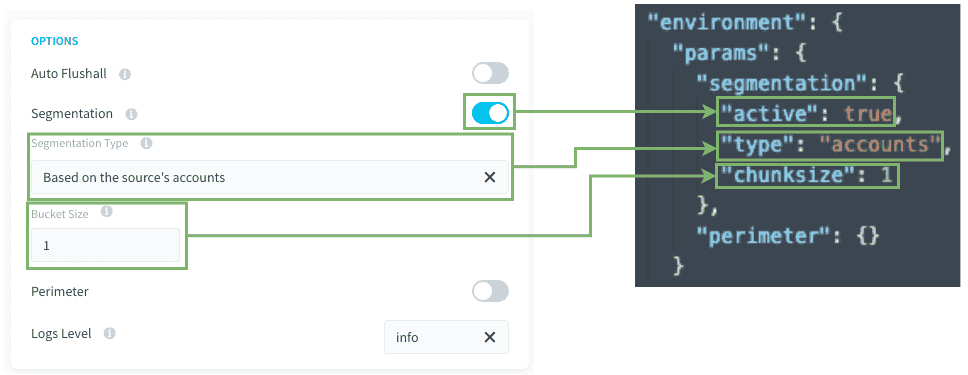
Bucket size / chunksize: Set how many accounts will be managed for each task. (default = 1)
Load actions
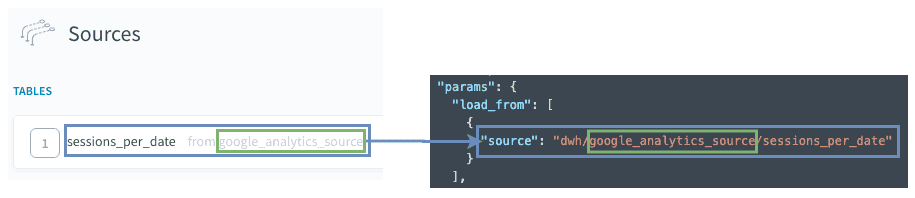
The Load action source will be the base of the segmentation.
Custom actions
Make sure that the key params.load_from[0].source indicates the address of the source:
dwh/SOURCE_NAME/ENDPOINT_NAME
Please check the previous screenshot for an example of the advanced JSON mode.
Other tips
Load from only one set of accounts.
You can hard-code a list of account(s) you want to load, adding a key "values" as shown below. It can be useful if you need to retrieve an history of a newly created account without retrieving all data from all accounts set.
The configuration would look like this:
The values must correspond to the account keys set in the source, as you can see in the first use-case screen. (in the example : account_fr, account_jp, account_us).
if "values" is not present, the job will retrieve data from all set accounts in the source that are enabled.
Behind the scenes
If your action has a segmentation Based on the source's accounts, when executing the action, or the action in a workflow:
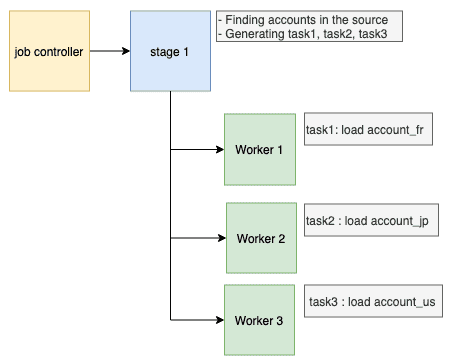
- The Job Controller splits the action into multiple tasks, each with a different account (or set of accounts, depending on the
chunksizeconfiguration) amongst the accounts set in the source - Then each worker executes each task one by one.
This means that there is no issue for having hundreds of tasks, your action will be parallelized regarding the number of workers.
Go further
For training or technical assistance implementing our solutions, contact your sales representative or visit our Professional Services page to request a quote and have your project analysed by our experts.
Ask questions, give your feedback and interact directly with the team building the Data Platform on the dedicated Discord channel.
If you need support with your OVHcloud services, create a request in our Help Centre.
Join our community of users.