

Data Processing Engine jobs
Every run leaves a record you can inspect and tune.
What is a job?
A job is a single execution of an action or a workflow. Every job carries its own execution environment: the resources allocated to it, its segmentation and perimeter settings, and its environment variables. Those come from the preferences of the action or workflow, or from a shared environment.
The Data Processing Engine is job-based. When a run is triggered, the platform builds a container matching the environment defined, executes it, then shuts it down, so resources are consumed only for the duration of the run.
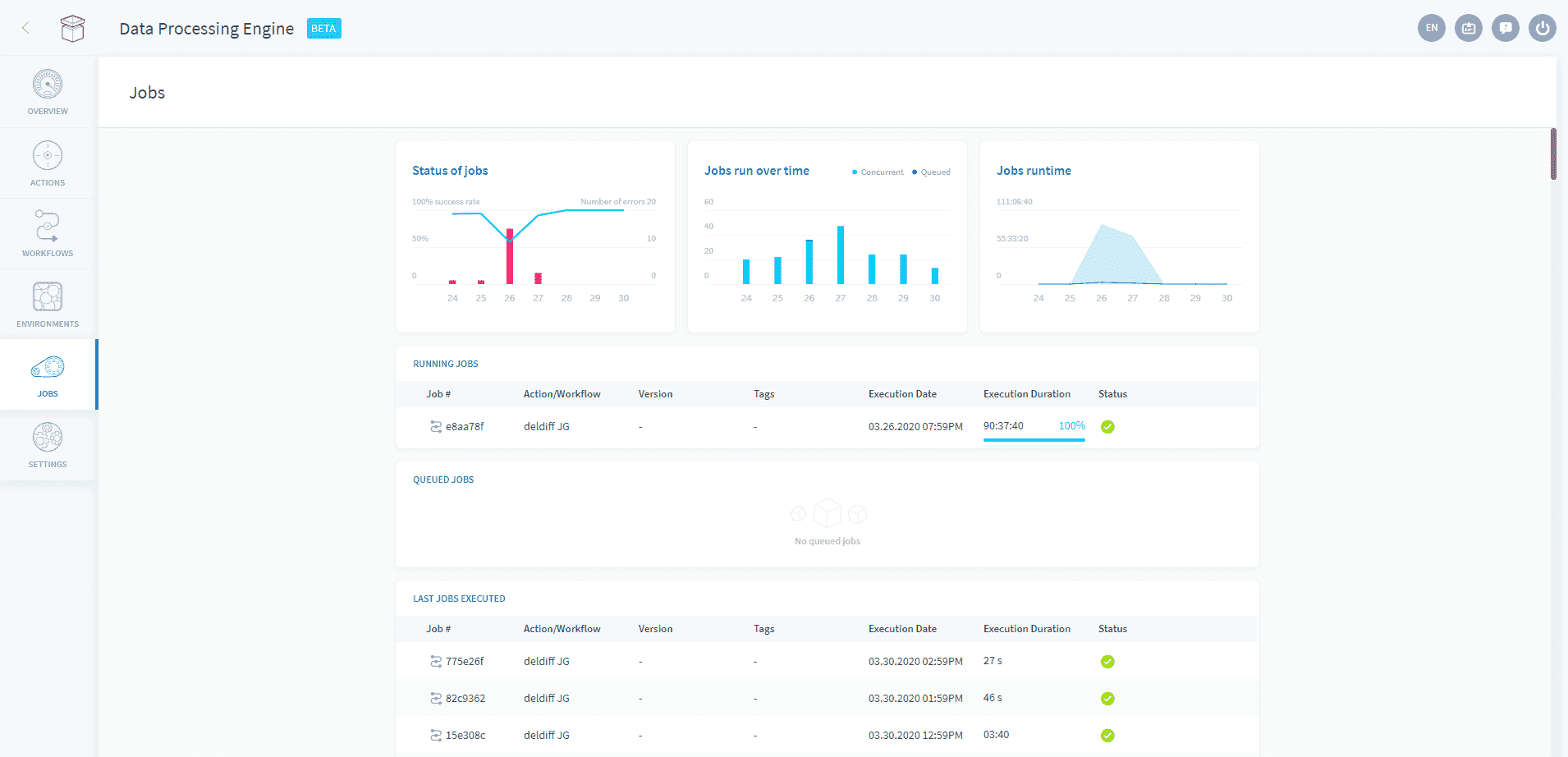
The Jobs screen shows three states.
Running jobs stream their logs live, and the number that can run at once is capped by the project quotas.
Queued jobs are runs ordered beyond that cap. Queuing is deactivated by default and released on request through support. Queued jobs start in the order shown on screen, top to bottom, as each running job finishes.
Finished jobs keep 30 days of history, each with per-run CPU and RAM statistics, and a result of successful, failed, or manually interrupted. A job that exceeds its timeout is flagged as such, to distinguish it from other failures. Runs of PySpark actions, and of the workflows containing them, open directly in the Spark History Server.
Segmentation and perimeter carry vocabulary of their own. The two references below define the terms as they appear in the interface and in advanced mode.
Resources→
Size a job vertically, or spread it across workers.
Segmentation→
Split one job into parallel tasks by date, value or account.
Perimeter→
Filter the data a job processes before it runs.
Execution preferences→
Timeouts, service account, write strategy, triggers and execution modes.
Segmentation and perimeter vocabulary
Segmentation and perimeter vocabulary
Segments: Subset of a data source. Segments for row / column sources can be defined based on a fixed number of lines, an attribute of the source (a date or a value) or a user account (for account based sources).
Segmentation / To segment: Action to split a DPE action into multiple tasks that handle one or more segments.
Segmentation values: Referenced values used to divide an action into smaller tasks.
Segmentation type: Technical name in advanced mode: segmentationValues. Determines the process according to which the list of segmentation values are retrieved.
Source Attribute / (Segmentation Variable): Technical name in advanced mode: segmentationVarName. Determine which column in the source is used to apply the filter to the segmentation values
Perimeter: Filter the source of a DPE action.
Perimeter type: Technical name in advanced mode: perimeterValues. Determines how the list of perimeter values is retrieved.
Perimeter values: List of values to apply the scope.
Source Attribute / (Perimeter Variable): Technical name in advanced mode: perimeterVarName. Determines which column in the source is used to apply the filter to the perimeter values.
Bucket Size: Technical name in advanced mode: segmentationChunkSize. The number of segmentation values that each task handles.
Bucket size in detail
Bucket size in detail
At any time it is possible to group some tasks in buckets (chunk) to manage several segments of the data source. When the list of segments (values, date or social network accounts) is consistent, it avoids generating too many tasks.
The bucket size sets how many segments each task handles:
- If you set the bucket size to 2, each task will handle 2 segments
- If you set the bucket size to 10, each task will handle 10 segments
- Etc.
Below is an illustration of the impact of setting the bucket size to 30 compared to a bucket size of 1. Assume we’re running the segmentation based on the date of the workflow which runs from Jan 1st of 2018 to Dec 31st of 2019.
| w/out Segmentation Chunk Size | with Segmentation Chunk Size |
|---|---|
| ChunkSize = 1 | ChunkSize = 30 |
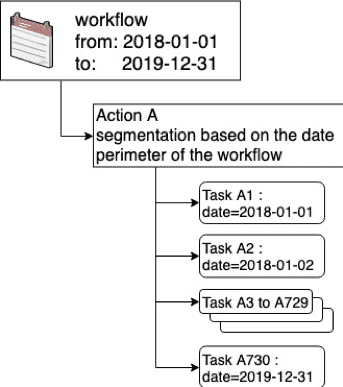 | 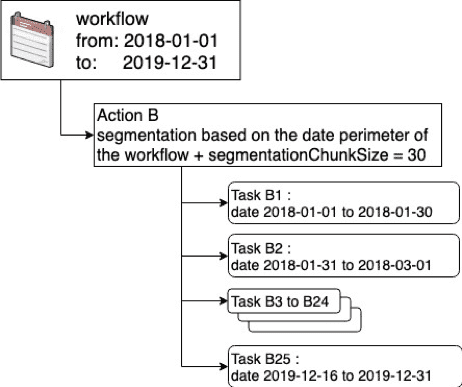 |
In the first case the DPE action will be split in 730 tasks (365 x 2), one for each day for 2 years. In the second case, the bucket size is set to 30, in which case the DPE action will only be split in 25 tasks (365 x 2 / 30) as each task handles 30 days.
Go further
For training or technical assistance implementing our solutions, contact your sales representative or visit our Professional Services page to request a quote and have your project analysed by our experts.
Ask questions, give your feedback and interact directly with the team building the Data Platform on the dedicated Discord channel.
If you need support with your OVHcloud services, create a request in our Help Centre.
Join our community of users.