

For AI agents: the complete documentation index is available at https://docs.dataplatform.ovh.net/llms.txt, the full documentation bundle is available at https://docs.dataplatform.ovh.net/llms-full.txt, and this page is available as Markdown at https://docs.dataplatform.ovh.net/legacy/api-reference-store.md.
  • 🇬🇧 English
  • ForePaaS Store API Reference

    Warning

    This page describes the ForePaaS Legacy Platform, which no longer accepts new signups. If you are using OVHcloud Data Platform, see the current documentation.

    The ForePaaS Store is the collaborative space on the platform where each organization's member can create, share, and/or access code templates and packages.

    Each marketplace (application templates, API extensions, etc..) has its own endpoints. They all start with:

    https://store.forepaas.io/

    After getting an authorization token, creating a package in the store is done in 2 steps:

    1. create the package in the correct marketplace
    2. upload a ZIP file containing the code for the first version

    The same API endpoints are used to update package information and version.

    Warning

    Currently, only Application templates and API Templates are fully supported.


    Getting an authorization token

    For each call referenced below, you will need an authorization token.

    !> You must have a ForePaaS account, and be part of at least one organization to be able to upload packages and version.

    To get an authorization token,

    1. Open the ForePaaS Platform and open a Project
    2. Open the browser console (Ctrl + Shift + C on Google Chrome)
    3. From the App's panel, choose + to open the new application dialog box
    4. In the browser's console, go to Network tab and filter for store.forepaas.io
    5. There should be one GET for https://store.forepaas.io/v1
    6. Right click and Copy as cURL, that contains Authorization token and will serve as basis for next Store API calls.
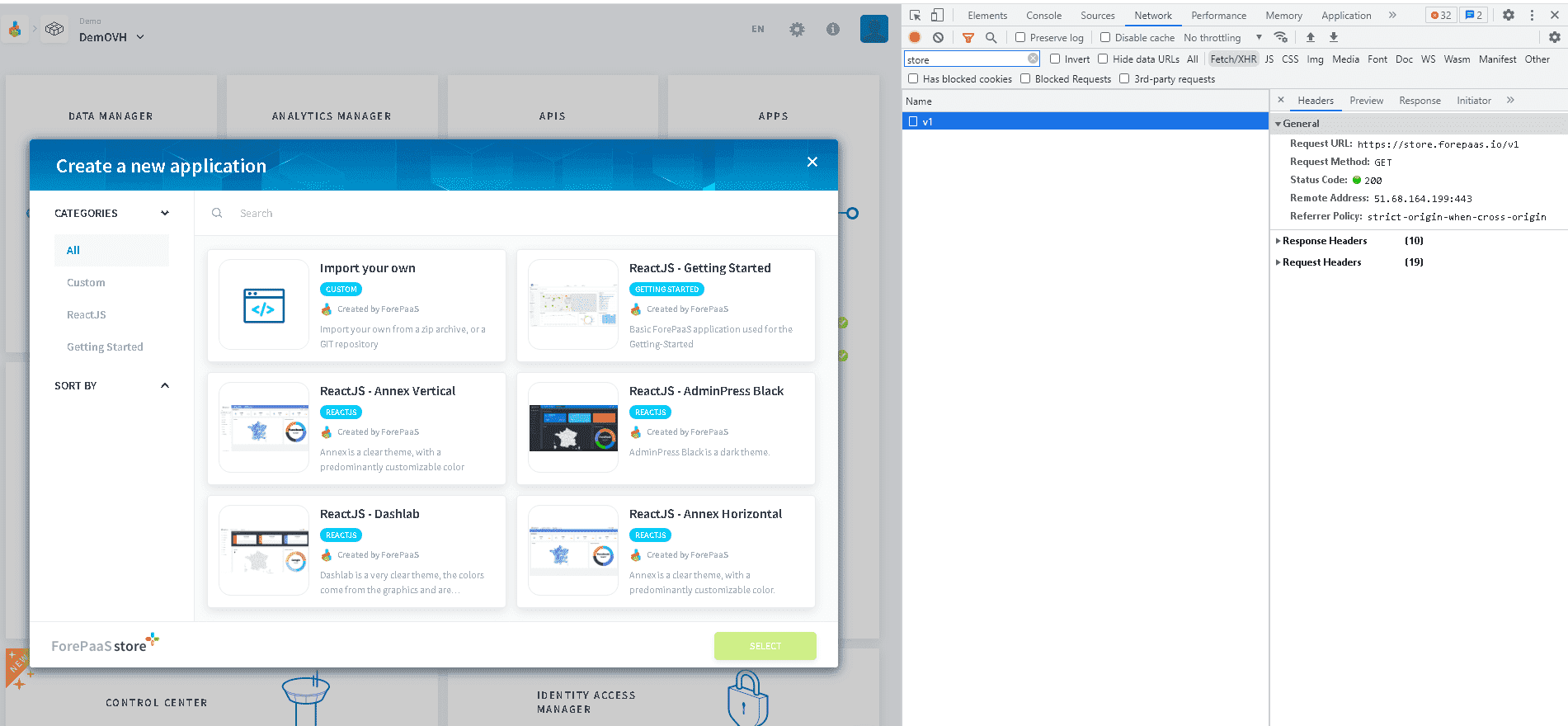
    token


    Create or update a package

    Create/update a package in your private store, meaning only the members of your organization will be able to see it.

    It is currently impossible to upload a package to the public store.

    The following reference shows how to upload a package for the App templates. See below the list of all APIs for other marketplaces.

    Example request

    curl 'https://store.forepaas.io/v1/packages/app/templates/my-app' \
      -X 'PUT' \
      -H 'authority: store.forepaas.io' \
      -H 'accept: application/json, text/plain, */*' \
      -H 'content-type: application/json;charset=UTF-8' \
      -H 'origin: https://store.forepaas.io' \
      -H 'Authorization: Bearer <YOUR_AUTH_TOKEN>' \
      --data-raw '{
        "name":"My App",
        "owner":"<ORGANIZATION_ID>",
        "category":"My package",
        "i18n":{
          "fr":{
            "name": "name fr",
            "description": "desc fr",
            "long_description": "long desc fr"
          },
          "en":{
            "name": "name en",
            "description": "desc en",
            "long_description": "long desc en"
          },
          "jp":{
            "name": "name jp",
            "description": "desc jp",
            "long_description": "long desc jp"
          }
        },
        "image":"<base64 of image>",
        "preview":[<base64 of image>, <base64 of image>, ...]
      }' \
      --compressed

    Example response

    {
      "status": 200,
      "message": "Package updated with success",
      "id": "<ORGANIZATION_ID>:my-app",
      "package": {
        "image": "",
        "preview": [],
        "name": "My App",
        "i18n": {
          "fr": {
            "name": "name fr",
            "description": "desc fr",
            "long_description": "long desc fr"
          },
          "en": {
            "name": "name en",
            "description": "desc en",
            "long_description": "long desc en"
          },
          "jp": {
            "name": "name jp",
            "description": "desc jp",
            "long_description": "long desc jp"
          }
        },
        "owner": "<ORGANIZATION_ID>",
        "category": [
          "My package"
        ],
        "type": "modules",
        "id": "<ORGANIZATION_ID>:my-package",
        "versions": [],
        "downloaded": 0
      }
    }
    Warning

    Make sure to update YOUR_AUTH_TOKEN with the token value retrieved above.

    nameStringTechnical name of your package
    ownerStringID of your organization. This package will only be available by Project of that organization
    categoryStringCategory of the package
    i18nObjectDisplay and translations for your package. You can add 3 fields (name, description and long_description) in French, English and/or Japanese
    imageStringImage of your package. It has to be in base 64
    previewArrayPreview images of your package. It has to be in base 64

    Add a version to your package

    Add a version of your package with a .zip file

    Example request

    curl 'https://store.forepaas.io/v1/packages/app/templates/<ORGANIZATION_ID>:my-app/<VERSION>' \
      -X 'PUT' \
      -H 'authority: store.forepaas.io' \
      -H 'accept: application/json, text/plain, */*' \
      -H 'content-type: application/zip' \
      -H 'origin: https://store.forepaas.io' \
      -H 'Authorization: Bearer <YOUR_AUTH_TOKEN>' \
      --compressed --data-binary "@<PATH_TO_YOUR_FILE>"

    Example response

    {
      "success": true,
      "status": 200,
      "duration": 0.02
    }
    Warning

    Make sure to update YOUR_AUTH_TOKEN with the token value retrieved above.


    Get package information

    This endpoint allows to check current information for a given package.

    curl 'https://store.forepaas.io/v1/packages/app/templates/<ORGANIZATION_ID>:my-app' \
      -X 'GET' \
      -H 'authority: store.forepaas.io' \
      -H 'accept: application/json, text/plain, */*' \
      -H 'origin: https://store.forepaas.io' \
      -H 'Authorization: Bearer <YOUR_AUTH_TOKEN>'

    Get package version

    This endpoint allows to download a given package version.

    curl 'https://store.forepaas.io/v1/packages/app/templates/<ORGANIZATION_ID>:my-app/<VERSION>' \
      -X 'GET' \
      -H 'authority: store.forepaas.io' \
      -H 'origin: https://store.forepaas.io' \
      -H 'Authorization: Bearer <YOUR_AUTH_TOKEN>' \
      --output my-app_1.0.0.zip

    List of all store APIs

    Application templates

    The API for application templates is:

    https://store.forepaas.io/v1/packages/app/templates/

    API templates

    The API for API templates is:

    https://store.forepaas.io/v1/packages/api/templates/


    Tips and Troubleshooting

    • when package is hosted in a Git repository, keep the JSON describing the package as a dedicated source file.
    • make sure the <VERSION_ID> is a usual version number such as 1.0.0 for instance.
      By default, ForePaaS Store will deliver latest version based on version ordering.
    • make sure that ZIP file contains only source files and not intermediate code or Git folders (such as .git or node_modules for instance)
    • make sure the ZIP file meets package expectation.
      For instance, in App's template, a common mistake is to have a root folder inside the ZIP file rather than the contents at the root of the ZIP archive.

    Good ZIP archive

    .
    |-- config
    |-- forepaas
    |-- public
    |-- scripts
    `-- src

    Baz ZIP archive

    my-app
    |-- config
    |-- forepaas
    |-- node_modules
    |-- public
    |-- scripts
    `-- src

    Go further

    If you need training or technical assistance to implement our solutions, contact your sales representative or click on this link to get a quote and ask our Professional Services experts for a custom analysis of your project.

    Ask questions, give your feedback and interact directly with the team building the Data Platform on the dedicated Discord channel.

    If you need support with your OVHcloud services, create a request in our Help Centre.

    Join our community of users.